-
Match the complete marking
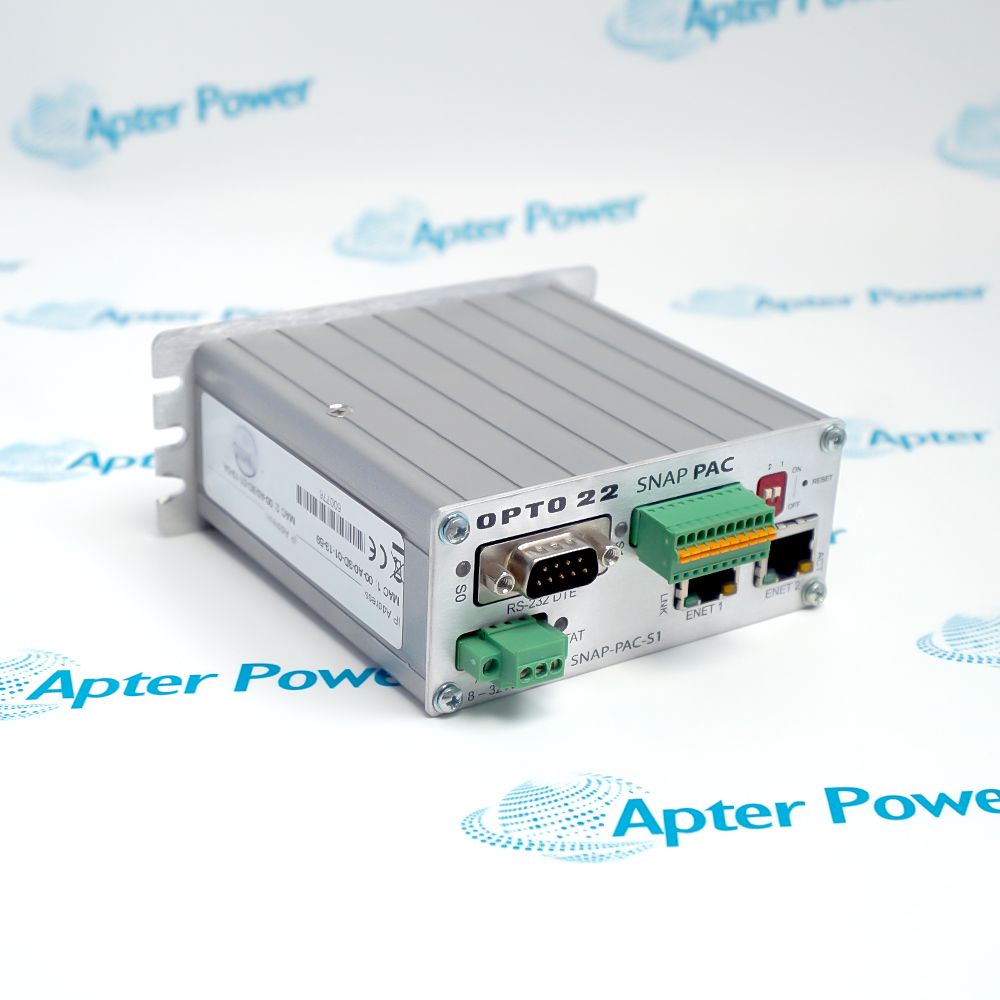
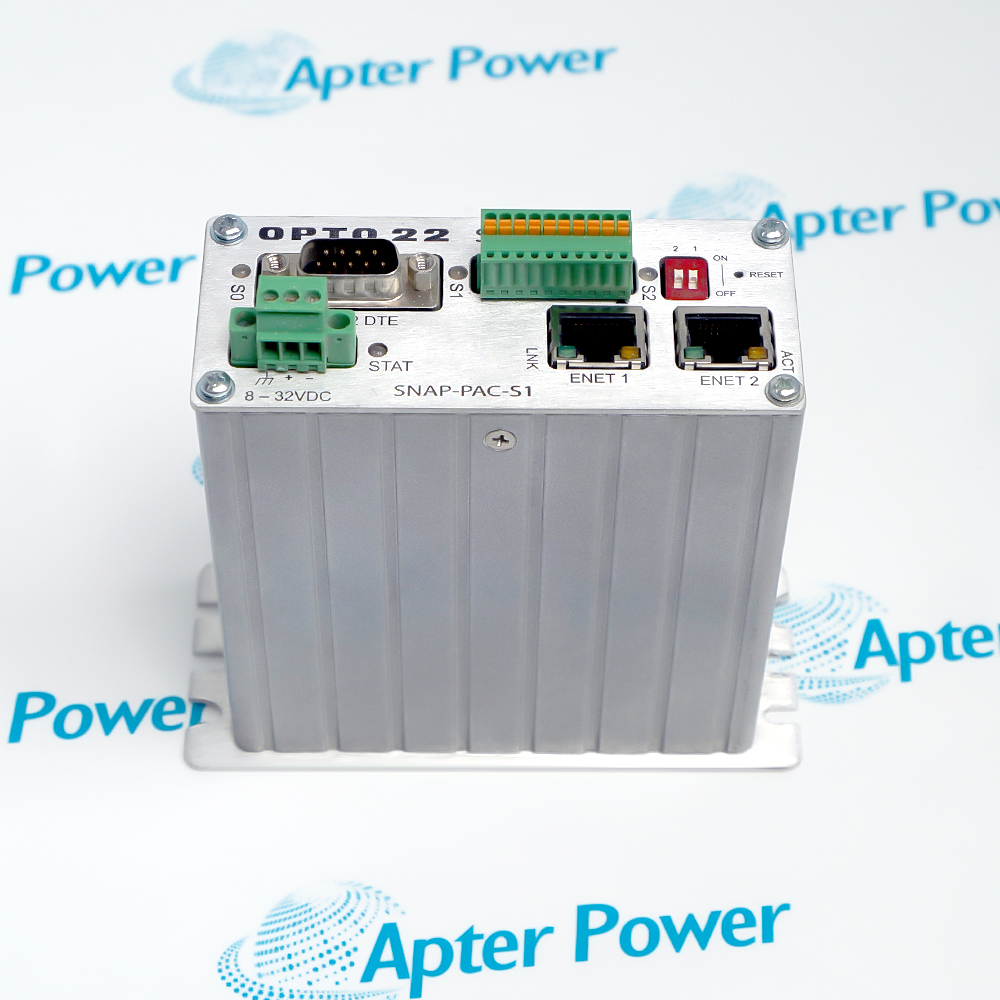
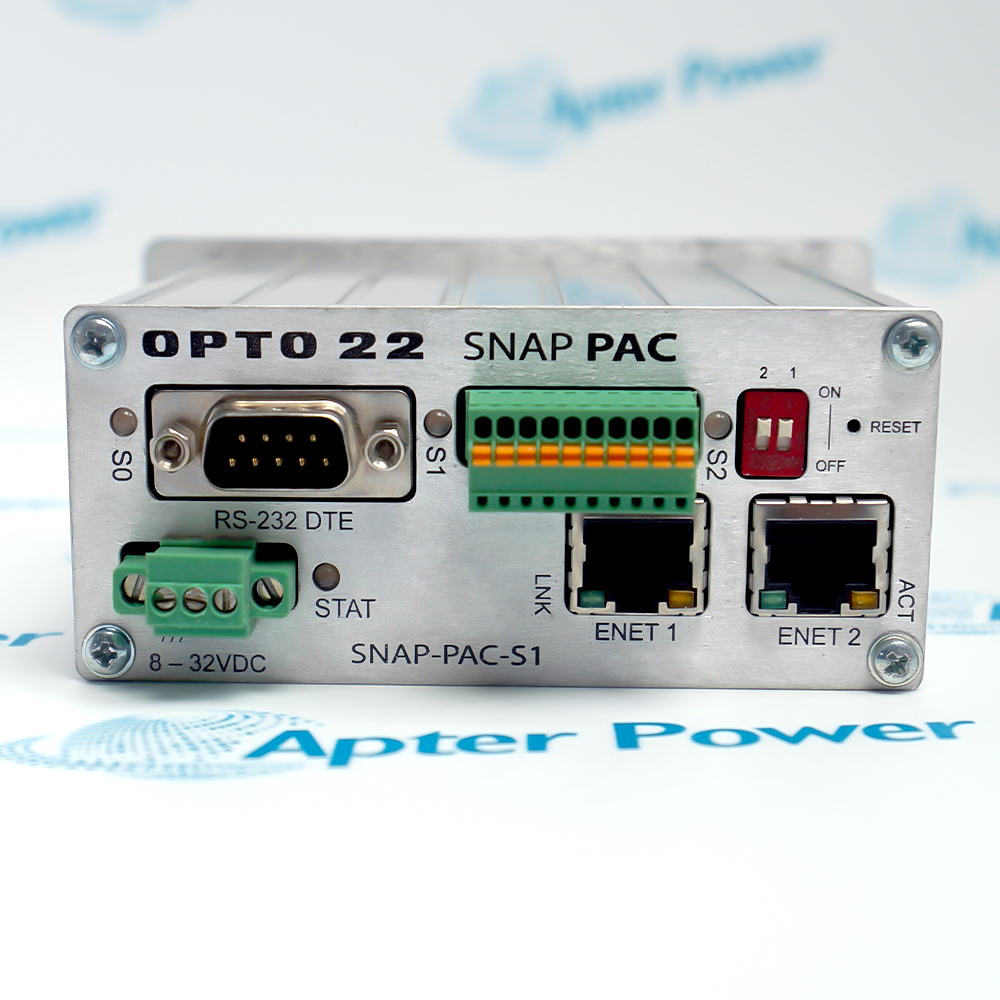
Record the complete SNAP-PAC-S1 marking, controller revision and the installed rack reference. Keep the same identity on the enquiry and quotation.
-
Check the offered item before ordering
Request available controller label, power and communication-port photos. Have your maintenance team compare the offered SNAP-PAC-S1 with the installed control system and applicable Opto 22 documentation.
Technical specifications for SNAP-PAC-S1
-
Manufacturer:Opto 22
-
Product Category:PLC Systems
-
Spare Part Number:SNAP-PAC-S1
-
Weight:0.4 kg
-
Tariff Code:8537101190
-
Processor:266 MHz 32-bit ColdFire 5475 with FPU
-
Total RAM:32 MB
-
Strategy RAM:16 MB for PAC Control strategies
-
Battery-backed RAM:8 MB
-
RAM file storage:2.5 MB
-
Flash file storage:4 MB
-
Ethernet interfaces:2 independent 10/100 Mbps RJ-45 ports
-
Ethernet addressing:Separate IP address and subnet per port
-
RS-232 ports:2; one DB-9 and one pluggable connector
-
RS-485 port:1 pluggable two-wire interface
-
Serial buffer:512 bytes each for RX and TX
-
Power input:8–32 VDC; serial numbers below 500,000: 8–24 VDC
-
Maximum demand:11.3 VA
-
Operating temperature:−20 to +60 °C
-
Storage temperature:−40 to +85 °C
-
Relative humidity:0–95%, non-condensing
-
REST API requirement:Firmware R9.5a or higher
Information
- Two independent Ethernet interfaces allow distinct control and enterprise network paths. The installed strategy, power supply, I/O processors and network design determine how the controller is used.
Network review: Record both IP addresses and connected switch paths
Serial inventory: Identify each RS-232 and RS-485 field device
Acceptance focus: Prove strategy startup and I/O communication after exchange
The controller uses a 266 MHz 32-bit ColdFire 5475 processor and 32 MB total RAM, of which 16 MB is available for PAC Control strategies. Power is 8–32 VDC with an 11.3 VA maximum; units with serial numbers below 500,000 are limited to 8–24 VDC, so the unit label and serial range must be checked.
The manufacturer sheet describes PAC Control strategies, Ethernet-based SNAP I/O and serial mistic/SNAP PAC I/O connectivity. RESTful API access requires firmware R9.5a or higher; microSD capacity and backup-battery type depend on manufacture date and serial number, so these features must be checked on the offered unit.
-
Apter Power technical reference for Opto 22 SNAP-PAC-S1
Prepared by Apter Power - PDF, 5 pages. Controller interfaces, version-dependent checks and system integration. -
Opto 22 SNAP-PAC-S1 installation guide
Prepared by Apter Power - PDF, 2 pages. Identification, installation checks, commissioning and fault isolation.
Application scope: Use where a PAC Control project must coordinate distributed I/O, serial devices and networked data paths within the documented interface limits.
-
Distributed SNAP I/O
Operate compatible Ethernet SNAP PAC brains and racks under the downloaded controller strategy. -
Legacy serial migration
Connect supported mistic or SNAP PAC serial I/O through the two-wire RS-485 interface using the required PAC Project Professional features. -
Network segmentation
Place control and enterprise traffic on separately addressed Ethernet interfaces when the site network architecture requires that separation. -
Serial equipment integration
Exchange application data with up to two RS-232 devices while maintaining the configured port roles and handshaking.
Export the running PAC Control strategy and configuration before removing the original controller.
Verify the unit serial number before applying the 8–32 VDC limit; older S1 units require the 8–24 VDC range.
Record each Ethernet port’s IP address, subnet and connected switch; accidental cross-connection can disrupt I/O.
Identify RS-232 port 0, port 1 and the two-wire RS-485 terminals separately before reconnecting cables.
Check firmware before using the REST API or removable storage; availability and capacity vary with version and manufacture date.
After installation, confirm strategy state, I/O communications, time settings and expected fail-safe responses before returning the process to service.
Alternative Names
Technical notes
System relationship: SNAP-PAC-S1 runs the PAC Control strategy while external SNAP I/O units provide field termination and the installed networks carry communication.
Version boundary: Serial number and firmware determine the applicable input-voltage range, backup battery, microSD support and REST access.
Technical reference: Opto 22 SNAP PAC S-Series Controllers, Form 1584-260513, pp. 1–5 and 10. Apply S1-column values and verify unit-specific versions.

FAQ View All FAQ
-
How can the two Ethernet ports of SNAP-PAC-S1 be used safely?Give each interface its own IP address and subnet and map each switch connection to the original design. Confirm whether the site uses separate control and enterprise paths or PAC Project Professional link redundancy before moving cables.
-
Why does the serial number matter for SNAP-PAC-S1 power selection?The Opto 22 sheet states 8–32 VDC for current S1 units but limits serial numbers below 500,000 to 8–24 VDC. Read the offered unit label and verify the installed supply before energizing.
-
Which SNAP-PAC-S1 serial port can support a PPP modem?The manufacturer describes PPP on RS-232 port 0. Record the original DB-9 cable and port configuration, then check the controller project before restoring a modem or substituting another serial device.
-
What must be retained when replacing SNAP-PAC-S1 in a live system?Archive the PAC Control strategy, firmware and loader versions, both Ethernet settings, serial port roles, I/O-unit list and any network security settings. Restore only after an exact-unit compatibility review.
-
Can SNAP-PAC-S1 use a RESTful API regardless of firmware?No. Opto 22 specifies firmware R9.5a or later for the built-in RESTful API. Verify the actual firmware and PAC Project configuration rather than assuming a unit has the feature from its part number alone.
-
How is legacy RS-485 I/O integrated with SNAP-PAC-S1?Use the two-wire RS-485 port for supported mistic or SNAP PAC serial I/O units and the appropriate PAC Project Professional strategy features. Check segment wiring, station addresses and termination against the existing network.
-
What should be checked before using a microSD card with SNAP-PAC-S1?Read the manufacture date plus firmware and loader versions. The Opto 22 sheet gives different card capacities for units built from November 2008 to May 2014 and units built from June 2014 onward.
-
What is a useful acceptance test after installing SNAP-PAC-S1?Verify power-up state, strategy execution, both Ethernet paths, every connected serial network, representative I/O points and the intended fail-safe behavior. Record firmware and as-left network settings for maintenance.
Supporting new and legacy automation
-
Please try to be as accurate as possible with your search.
-
We can quote you on 1000s of specialist parts, even if they are not listed on our website.
-
We can't find any results for “”.
Related cases and sourcing guidance
View all case studiesYou May Also Like
Product Browsing History
-
Whatsapp: +86 18030235313
Send us a message. -
sales13@apterpower.com
Complete our online form. -
+86 18030235313
Speak to our team in your native language.