-
Match the complete marking
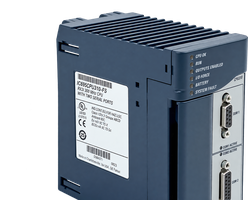
Include IC695PNC001 and the hardware suffix visible on the module. Keep the exact reference on your enquiry and quotation.
-
Check the offered item before ordering
Request available label and connector photos. Have your maintenance team compare the offered IC695PNC001 with the installed RX3i rack and applicable Emerson documentation.
Technical specifications for IC695PNC001
-
Manufacturer:General Electric
-
Product Category:PLC Systems
-
Weight:0.35 kg
-
Product family:PACSystems RX3i
-
Module function:PROFINET I/O controller
-
Catalog reference:IC695PNC001
-
Host architecture:RX3i rack-based controller
-
Network role:Configured PROFINET devices
-
Hardware implementations:Ax; Bxxx
-
Extended PROFINET subslots:Ax 2.25+; Bxxx 3.00+
-
Remote HART information:Ax 2.26+; Bxxx 3.00+
-
Simplex PROFINET I/O:Ax 2.00+; Bxxx 3.00+
-
CPE302/305/310-Axxx 10.05+ pairing:Bxxx 3.16+
Information
- IC695PNC001 provides the PROFINET controller role inside an RX3i application; its actual device map and supported features are determined by the installed hardware and firmware.
Host: PACSystems RX3i CPU and main rack
Configuration boundary: CPU, PNC and engineering-software revisions
The installation has a revision boundary. Emerson CPU product information distinguishes IC695PNC001-Ax and IC695PNC001-Bxxx hardware. Features such as extended subslot numbers, remote HART device information and certain CPU combinations have minimum firmware versions; check the actual suffix and releases before restoring a project.
A replacement should preserve the RX3i rack position, controller project, network topology, device identity and PROFINET I/O map. Acceptance requires checking the CPU and PNC diagnostics together, then proving that each configured I/O device exchanges the intended data under an approved machine test.
-
General Electric IC695PNC001 technical reference
Apter Power technical reference - PDF, 3 pages. RX3i PROFINET role, revision-sensitive compatibility, applications and diagnostic decisions. -
General Electric IC695PNC001 installation and commissioning guide
Apter Power engineering guide - PDF, 2 pages. Preparation, replacement sequence, acceptance evidence and fault isolation.
Replacement boundary: Preserve the complete module marking, firmware and project-specific network mapping.
-
Remote I/O integration
Control configured PROFINET I/O devices from the RX3i application. -
Controller maintenance
Replace an installed PNC while retaining the documented rack slot, network identity and I/O map. -
Revision planning
Check Ax or Bxxx hardware and firmware requirements before enabling version-dependent features. -
Network fault isolation
Correlate PNC, CPU and device diagnostics with physical link and configured device identity.
Record the exact IC695PNC001 suffix before selecting a firmware or feature path.
Back up the controller logic and PROFINET device configuration before removal.
Follow the site procedure for the energized rack and attached network before service.
Record device names, addressing and I/O mapping used by the installed project.
Compare PNC, CPU and PAC Machine Edition requirements for the installed feature set.
After restoration, verify configured devices, data exchange and diagnostics under an approved test.

Alternative Names
Technical notes
FAQ View All FAQ
-
What role does IC695PNC001 have in an RX3i system?It provides the PROFINET I/O controller function for the configured RX3i application. Keep its role separate from the IC695PNS001 scanner role.
-
Why must the IC695PNC001 hardware suffix be checked?Emerson compatibility tables separate Ax and Bxxx implementations, and feature thresholds differ between them.
-
What should be archived before replacing IC695PNC001?Save the RX3i project, PNC firmware identification, device names, network addressing and I/O mapping.
-
How should IC695PNC001 compatibility with the host CPU be checked?Compare the actual CPU firmware, PNC hardware suffix and PNC firmware with the feature-specific compatibility table before restoring the project.
-
When can IC695PNC001 use extended PROFINET subslots?The cited RX3i table gives a minimum of 2.25 for Ax hardware and 3.00 for Bxxx hardware; confirm the installed revision and CPU project.
-
Can IC695PNC001 remote HART information be assumed for every revision?No. The cited table requires PNC Ax 2.26 or Bxxx 3.00, plus compatible CPU and scanner versions for the configured path.
-
What should be checked after IC695PNC001 is installed?Confirm module status, network link, configured device identity and expected I/O data exchange under an approved test.
-
What can cause an IC695PNC001 network to appear healthy while I/O is unavailable?A physical link alone does not prove matching device names, configuration, data map or CPU ownership. Check diagnostics at the PNC and each configured device.
Supporting new and legacy automation
-
Please try to be as accurate as possible with your search.
-
We can quote you on 1000s of specialist parts, even if they are not listed on our website.
-
We can't find any results for “”.
Related cases and sourcing guidance
View all case studiesYou May Also Like
Product Browsing History
-
Whatsapp: +86 18030235313
Send us a message. -
sales13@apterpower.com
Complete our online form. -
+86 18030235313
Speak to our team in your native language.