Speak to a sourcing specialist
sales13@apterpower.com
Get a quick price for 6DL3100-8AA
E-mail *
Mobile *
Company
Content *
Quantity *
Upload (gif, jpg, jpeg, png, bmp, doc, docx, xls, xlsx, ppt, pdf, csv)
For more information on how your data is processed and stored by Apterpower please read our privacy policy

What happens after you enquire

  • 1

    Requirement review

    We review the part number, quantity and delivery requirements and ask for any missing details.
  • 2

    Quotation and availability

    We confirm the proposed item, condition, availability, price and estimated lead time in the quotation.
  • 3

    Order confirmation and dispatch

    Once the quotation and purchasing details are agreed, your contact will coordinate the order and available dispatch information.

Technical specifications for 6DL3100-8AA

  • Manufacturer:
    Siemens
  • Product Category:
    DCS Systems
  • Spare Part Number:
    6DL3100-8AA
  • Estimated shipping dimensions:
    7.5x21x29cm
  • Weight:
    2.8 kg
  • Tariff Code:
    8537101190
  • Counliy of origin:
    Germany
  • Product designation:
    AddFEM
  • Hardware type:
    Front end module
  • Documented function:
    Basic I/O
  • Host examples:
    SIMADYN D / TXP AS 620 T
  • GSD model:
    Si0180A3.GS?
  • Power requirement:
    24 V DC PELV or SELV
  • Equipment class:
    Open equipment / open type
  • Protection degree:
    IP20
  • Acceptance:
    GSD match, I/O diagnostics and redundancy state

Information

Overview Manuals Common Applications Product Precautions
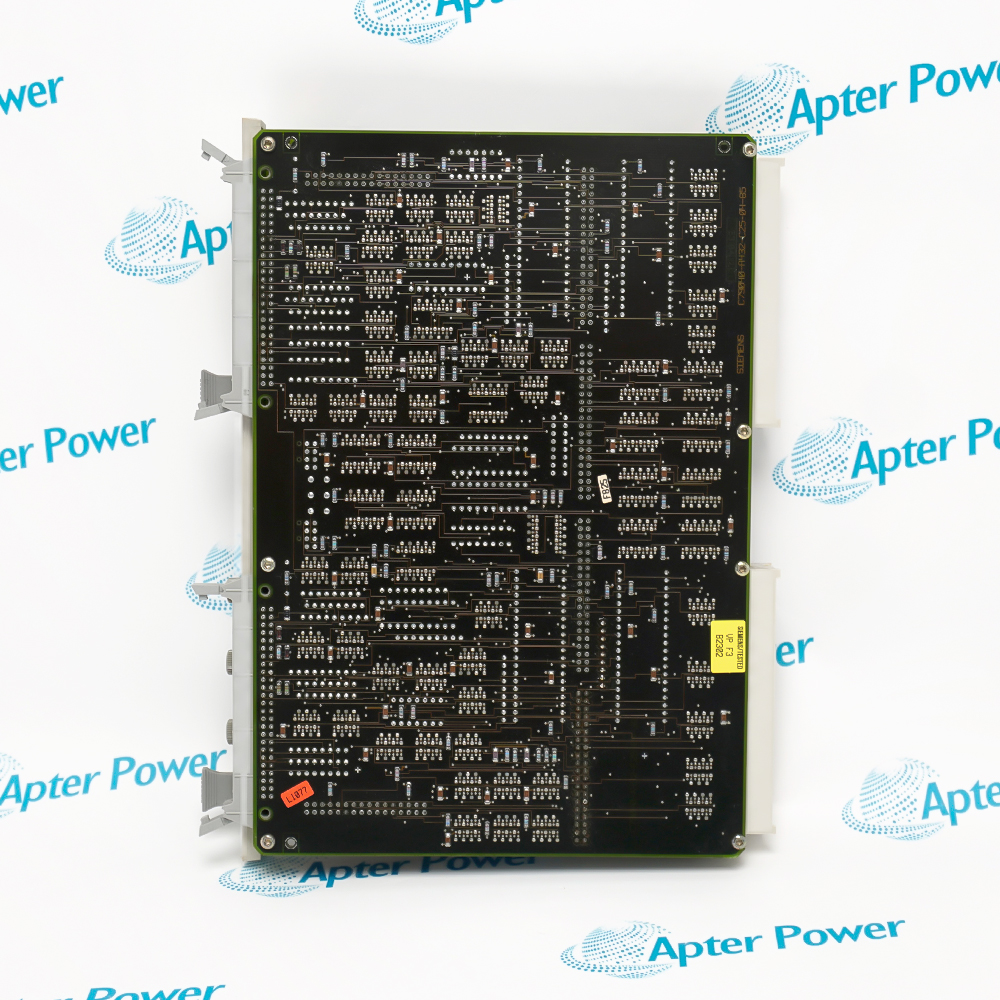
Siemens 6DL3100-8AA provides the AddFEM front-end function used to integrate basic I/O into a documented SIMADYN D or TELEPERM XP control architecture.
  • Identifies the -8AA AddFEM execution.
  • Provides the documented basic I/O function.
  • Uses 24 V DC PELV or SELV power.
  • Operates as IP20 open equipment within its enclosure.

The configured GSD entry, PROFIBUS relationship and redundancy state determine how this front end participates in the host system. Preserve those records before replacing the module.

Important Notice: Confirm the Si0180A3.GS? model selection and the complete 6DL3100-8AA marking before accepting I/O communication.

Siemens 6DL3100-8AA Manuals & Downloads
Siemens 6DL3100-8AA Official Technical Reference Excerpt (PDF)Siemens 6DL3100-8AA Installation & Commissioning Guide (PDF)

The excerpt establishes AddFEM, power and enclosure facts; the companion guide covers GSD matching, PROFIBUS integration, I/O diagnostics and redundancy-state verification.


SIMADYN D front-end I/O
Connects the documented AddFEM basic-I/O role to its assigned automation system.
TELEPERM XP integration
Supports a recorded TXP AS 620 T installation without changing its host architecture.
PROFIBUS configuration service
Uses the selected GSD model and station record to restore field communication.
Redundancy-state verification
Checks I/O diagnostics and the expected operating state after module renewal.
Before servicing 6DL3100-8AA, capture the AddFEM host, GSD selection and PROFIBUS state. Do not treat the module as independent generic I/O.
1
Match the exact -8AA order number and AddFEM designation.
2
Use only the documented 24 V DC PELV or SELV source.
3
Maintain the required enclosure for this IP20 open equipment.
4
Save the station address and selected Si0180A3.GS? model.
5
Label PROFIBUS and basic-I/O connections before removal.
6
Restore shielding, termination and the documented bus topology.
7
Review channel diagnostics and the configured redundancy state.
8
Accept only after commanded I/O matches the host indication.

Technical notes

Match Siemens 6DL3100-8AA to the complete installed record, host position and companion hardware. Preserve connections and settings; then verify diagnostics and front-end I/O integration in a documented SIMADYN D or TELEPERM XP architecture under controlled conditions.

FAQ View All FAQ

  • What does 6DL3100-8AA identify?
    6DL3100-8AA identifies the addfem front end module used for front-end I/O integration in a documented SIMADYN D or TELEPERM XP architecture.
  • Which installed system must 6DL3100-8AA match?
    Match 6DL3100-8AA to the recorded SIMADYN D / TELEPERM XP host, position and companion hardware.
  • Which markings must be checked on 6DL3100-8AA?
    Verify the complete 6DL3100-8AA text and every suffix, revision or assembly marking on the supplied item.
  • What should be recorded before removing 6DL3100-8AA?
    Record the slot, connectors, cable labels, switches, parameters, adjacent hardware and diagnostic state.
  • Can 6DL3100-8AA be replaced by appearance alone?
    No. 6DL3100-8AA requires an exact identity and interface match against the installed-system record.
  • How should 6DL3100-8AA be isolated?
    Use the approved maintenance state, remove connected energy and prove the affected circuit safe.
  • What is checked after installing 6DL3100-8AA?
    Check mechanical seating, wiring, settings, communication, diagnostics and every affected function.
  • What releases 6DL3100-8AA to service?
    A recorded acceptance test must confirm front-end I/O integration in a documented SIMADYN D or TELEPERM XP architecture without unexpected alarms or process response.
Manufacturers

Product Browsing History

Revisit the products you recently viewed on Apter Power.
SPEAK TO OUR TEAM
Let’s find the right solution for you.
Send us the part number, quantity and delivery destination. Our team will help confirm availability and lead time.
  • Whatsapp: +86 18030235313

    Send us a message.
  • sales13@apterpower.com

    Complete our online form.
  • +86 18030235313

    Speak to our team in your native language.