Speak to a sourcing specialist
sales13@apterpower.com

OL2109

Eight-Point Digital Output Module
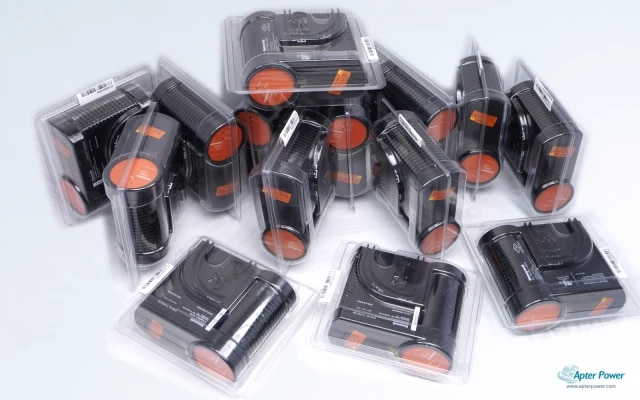
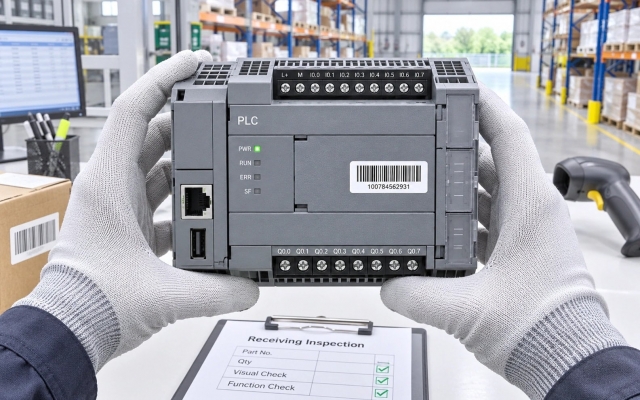
Product image is representative; revision or series may vary. Contact us to request a specific version.

Product Describe:

OPTILOGTC OL2109 is identified as a eight-point digital output module for the OptiLogic modular I/O platform. The complete marking and installed interface arrangement must be matched together before replacement.
  • Manufacturer part number
    OL2109
  • Shipping
    Swift global dispatch
  • Condition
    New, original product
  • Shipping size (est.)
    1.9cm × 7.5cm × 7.8cm
  • Country of Origin
    USA
Get a quick price for OL2109
E-mail *
Mobile
Company
Content *
Quantity *
Upload (gif, jpg, jpeg, png, bmp, doc, docx, xls, xlsx, ppt, pdf, csv)
For more information on how your data is processed and stored by Apterpower please read our privacy policy

What happens after you enquire

  • 0

    Review your reference

    Send the complete OL2109 marking, quantity and installed-system context. Include the installed-system context and any visible revision in the request.

  • 1

    Confirm the offer

    Review the offered identity, condition, included items and delivery details. Confirm the included hardware and stated condition before acceptance.

  • 2

    Arrange dispatch

    Confirm the accepted quantity and destination in the quotation. Retain the dispatch and delivery details with the order record.

  • Match the complete marking

    Compare OL2109 with the installed label and applicable OPTILOGTC documentation.

  • Check the offered item before ordering

    Request photos of the offered OL2109 and compare markings, interfaces and included items with the installed unit.

Technical specifications for OL2109

  • Manufacturer:
    OPTILOGTC
  • Product Category:
    PLC Systems
  • Spare Part Number:
    OL2109
  • Weight:
    0.06 kg
  • Tariff Code:
    8537101190
  • Equipment role:
    Eight-Point Digital Output Module
  • System context:
    OptiLogic modular I/O platform
  • Output points:
    8
  • Fail-safe behavior:
    All off, pattern or last state
  • Fail-safe delay:
    Up to 25.5 seconds
  • Addressing:
    S:DO, points 0–7
  • Output use:
    On/off loads including lights, motors and solenoids
  • Point access:
    Boolean read/write
  • Packed access:
    Byte, Word, Short, DWord or Long at offset 0
  • Delay resolution:
    0.1 second
  • Delay range:
    0 to 25.5 seconds

Information

Overview Downloads Applications / Compatibility Product Precautions
  • OL2109 occupies a defined service position in the OptiLogic modular I/O platform; selection depends on the complete marking and installed boundary.
Output map: Eight digital points use S[slot]:DO[point] addressing for points 0 through 7.
Fail-safe state: The module can drive all outputs off, a configured pattern or the last state.
Fail-safe delay: FS.TIME is set in 0.1-second increments up to 25.5 seconds.
The complete OL2109 marking identifies the offered eight-point digital output module. Record the removed item, host position and connected hardware so the comparison uses the actual installed boundary rather than a shortened family name.

Within the OptiLogic modular I/O platform, evaluate this item together with its carrier, terminals, cables and project or hardware settings. Preserve the as-found interface map and revision evidence; a mechanically similar item is not automatically equivalent.

Commissioning should progress from identity and connection checks to controlled power-up, diagnostics and functional proof. Keep the final status, test conditions and open exceptions in the handover record.
Controller platform reference: OptiLogic modular I/O. Confirm slot addressing, output map and configured fail-safe behavior.
The technical document supports identity and system-role review for OL2109. The separate field guide covers installation checks, commissioning, diagnostics and handover.
Use the applicable OPTILOGTC documentation and site-approved installation procedure for OL2109.
Prepare OPTILOGTC OL2109 using the applicable installation instructions and site isolation procedure.
Verify the complete identity

Check every token in OL2109 against the offered label and approved record.

Isolate the work boundary

Follow the site procedure for stored energy, field power and electrostatic handling.

Record connections

Photograph and label carriers, terminals, cables and keying before removal.

Preserve configuration

Archive applicable OptiLogic modular I/O platform settings before replacement.

Inspect mating hardware

Check connectors, terminal blocks, carriers and cable condition before blaming the module.

Prove the result

Use an approved functional test and retain as-left diagnostic and acceptance evidence.

Alternative Names

OptiLogic OL2109 Digital Output Module OPTILOGTC OL 2109

Technical notes

Pre-purchase checks: Match the offered OL2109 nameplate, supported module identity and hardware execution with the installed OptiLogic I/O record.

I/O and addressing pairing: Verify the eight output points, S[slot]:DO[point] addressing, fail-safe state and configured delay against the installed application. A module mentioned in system information is not automatically included with the offered unit.

Quotation confirmation: Confirm available quantity, estimated dispatch date, lead-time starting event, included items and documents in writing. Country of origin: USA. Condition: New, original product. Supply scope: Confirmed in quotation.


FAQ View All FAQ

  • How should OL2109 be identified before a replacement is approved?
    Compare every token in the complete marking, installed position and documented eight-point digital output module role. Confirm the physical label before approval.
  • What evidence should be retained before removing OL2109?
    Record the mounting position, connected interfaces, status indications and current OptiLogic modular I/O platform configuration. Photograph the complete label before disconnection.
  • How should the interfaces for OL2109 be checked during installation?
    Map each connector, terminal and cable to the as-found record and applicable manufacturer documentation. Preserve keying and shielding arrangements.
  • What configuration boundary matters when commissioning OL2109?
    Use the approved OptiLogic modular I/O platform record and exact hardware execution. Physical fit alone does not prove configuration or interface equivalence.
  • How can a suspected OL2109 fault be separated from wiring or carrier faults?
    Verify supply and reference conditions, then inspect mating hardware and external wiring. Use controlled substitution only after both signal paths are documented.
  • What should be verified after fitting OL2109?
    Confirm normal indications, communication or signal continuity and the intended controlled-system response under an approved test state.
  • Can OL2109 be replaced by a similar-looking assembly?
    No direct equivalence is established by appearance. Compare the complete code, revision, interface execution and installed configuration.
  • What handover record is appropriate after work on OL2109?
    Retain offered and removed markings, connection photographs, configuration evidence, diagnostics, functional-test results and unresolved exceptions.
Manufacturers

You May Also Like

Explore related automation components available through Apter Power.
SPEAK TO OUR TEAM
Let’s find the right solution for you.
Send us the part number, quantity and delivery destination. Our team will help confirm availability and lead time.
  • Whatsapp: +86 18030235313

    Send us a message.
  • sales13@apterpower.com

    Complete our online form.
  • +86 18030235313

    Speak to our team in your native language.