-
Match the complete marking
Include XN05 and any revision or assembly number visible on the item. Keep the exact reference on your enquiry and quotation.
-
Check the offered item before ordering
Request available front-panel, label and connector photos. Have your maintenance team compare the offered XN05 with the installed Contronic 3 hardware and applicable ABB documentation.
Technical specifications for XN05
-
Manufacturer:ABB
-
Product Category:DCS Systems
-
Spare Part Number:XN05
-
Weight:0.32 kg
-
Tariff Code:8537101190
-
Product family:H&B Contronic 3
-
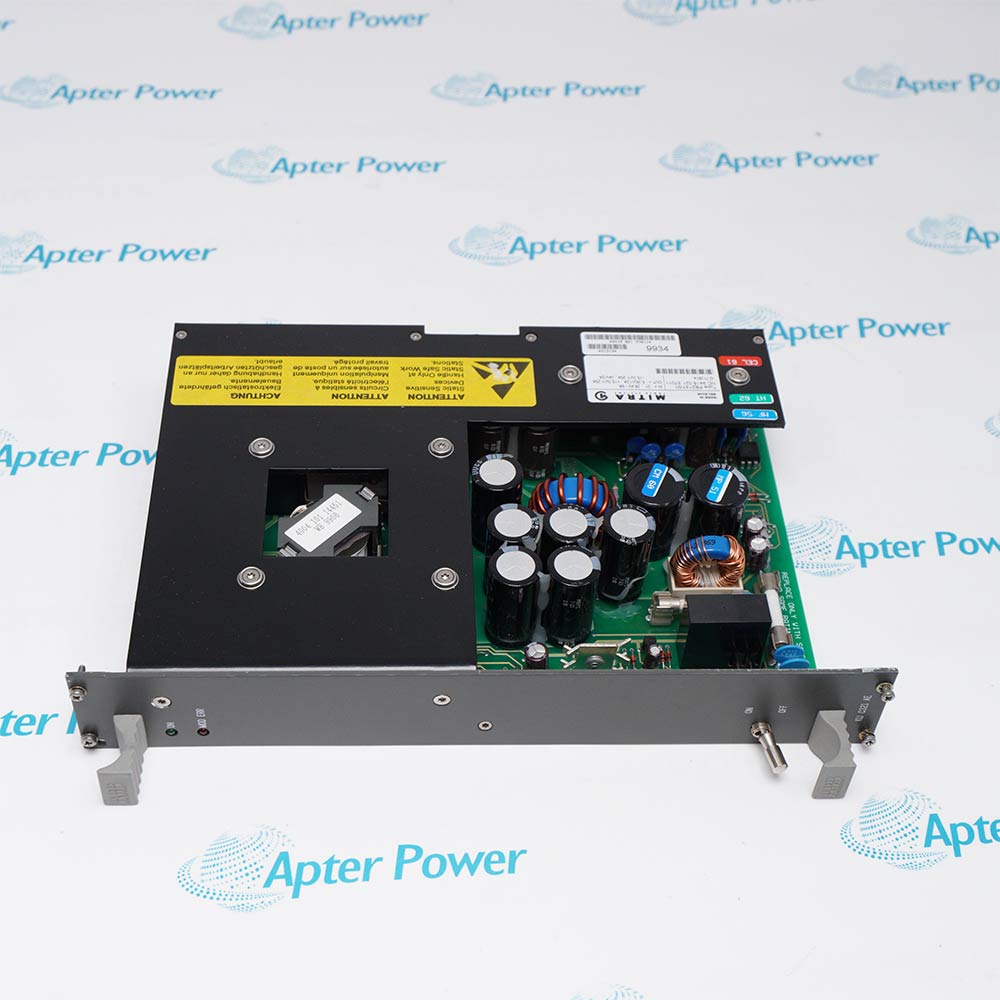
Observed construction:Front-panel plug-in module
-
Functional designation:Universal Redundance Circuit (Monitoring Part)
Information
- XN05 is identified as a Contronic 3 hardware item. Its functional listing is universal redundance circuit (monitoring part).
Physical form: Front-panel module
Selection: Match installed marking and cabinet record
The available photographs show a narrow front-panel module with visible identification and operator-facing features. The photographs establish physical identification but do not establish supply voltage, current, signal range or terminal pinout.
For a replacement, compare the complete XN05 marking, visible hardware version, connection arrangement and installed slot with the original unit. Preserve the project settings and test the affected function under the approved site procedure.
-
ABB XN05 technical reference
Apter Power technical reference - PDF, 1 page. Product identity, engineering context and applicability conditions. -
ABB XN05 installation guide
Prepared by Apter Power - PDF, 1 page. Configuration review, safe installation and functional acceptance.
Compatibility: The full XN05 identity and cabinet design control replacement selection; no cross-model interchangeability is established.
-
Contronic 3 redundancy monitoring
Monitoring part of a universal redundancy arrangement. Verify the host cabinet design before use. -
Installed cabinet replacement
Use the complete XN05 marking to identify the position shown in the project hardware list. -
System integration
Check the adjacent modules, rack connection and signal path in the as-built drawings. -
Maintenance verification
Compare the resulting cabinet indications and affected process function with the recorded baseline.
Record the XN05 position and neighboring modules before removal.
Photograph both sides and all visible identification and revision markings.
Compare the mating connector and mechanical guides with the installed assembly.
Follow the approved isolation and electrostatic-discharge procedure before handling.
Keep the original wiring and any adjustable settings in the approved project state.
Test the affected control or monitoring path under the site acceptance plan.
Alternative Names
Technical notes
Identification: The offered item carries the complete XN05 reference; compare the physical revision and host position with the installed unit.
Application boundary: The material-list wording establishes the functional name only. Electrical ratings, terminal assignments and approved interchangeability require matching original manufacturer data or the installed project record.
Engineering review: Use the project-specific connection and acceptance records to establish electrical and functional compatibility.

FAQ View All FAQ
-
Which project document establishes the host position of XN05?Use the as-built cabinet layout, module schedule and wiring diagrams for the installed system.
-
How should a revision difference on XN05 be handled?Compare the original and offered markings, then obtain the project-approved compatibility decision before replacement.
-
Which checks help separate a XN05 fault from a wiring problem?Compare supply and signal symptoms at the system level, inspect the mating connection and use approved diagnostics; do not infer a card fault from one indication.
-
Can XN05 be substituted for a nearby Contronic model?No substitution is established from a similar appearance or adjacent model number. Verify a manufacturer-approved replacement for the installed arrangement.
-
What should be preserved before removing XN05?Keep as-found photographs, slot position, neighboring-module list, adjustable settings and cabinet diagnostic records.
-
How should the affected function be accepted after changing XN05?Apply the approved functional test, compare results with the baseline and record alarms and process responses.
-
What if a replacement XN05 is correctly seated but the system remains abnormal?Check companion modules, connectors, configuration and the site signal path before drawing a conclusion about the replacement.
-
Which information is required to assess an offered XN05 before purchase?Request full-marking photographs and revision details, then compare them with the installed unit and project-approved module list.
Supporting new and legacy automation
-
Please try to be as accurate as possible with your search.
-
We can quote you on 1000s of specialist parts, even if they are not listed on our website.
-
We can't find any results for “”.
Related cases and sourcing guidance
View all case studiesYou May Also Like
Product Browsing History
-
Whatsapp: +86 18030235313
Send us a message. -
sales13@apterpower.com
Complete our online form. -
+86 18030235313
Speak to our team in your native language.