Speak to a sourcing specialist
sales13@apterpower.com

MT8121IE

12.1-inch TFT Industrial HMI Touch Panel
In Stock
Ships by Wednesday, November 11
Fast Shipping Available
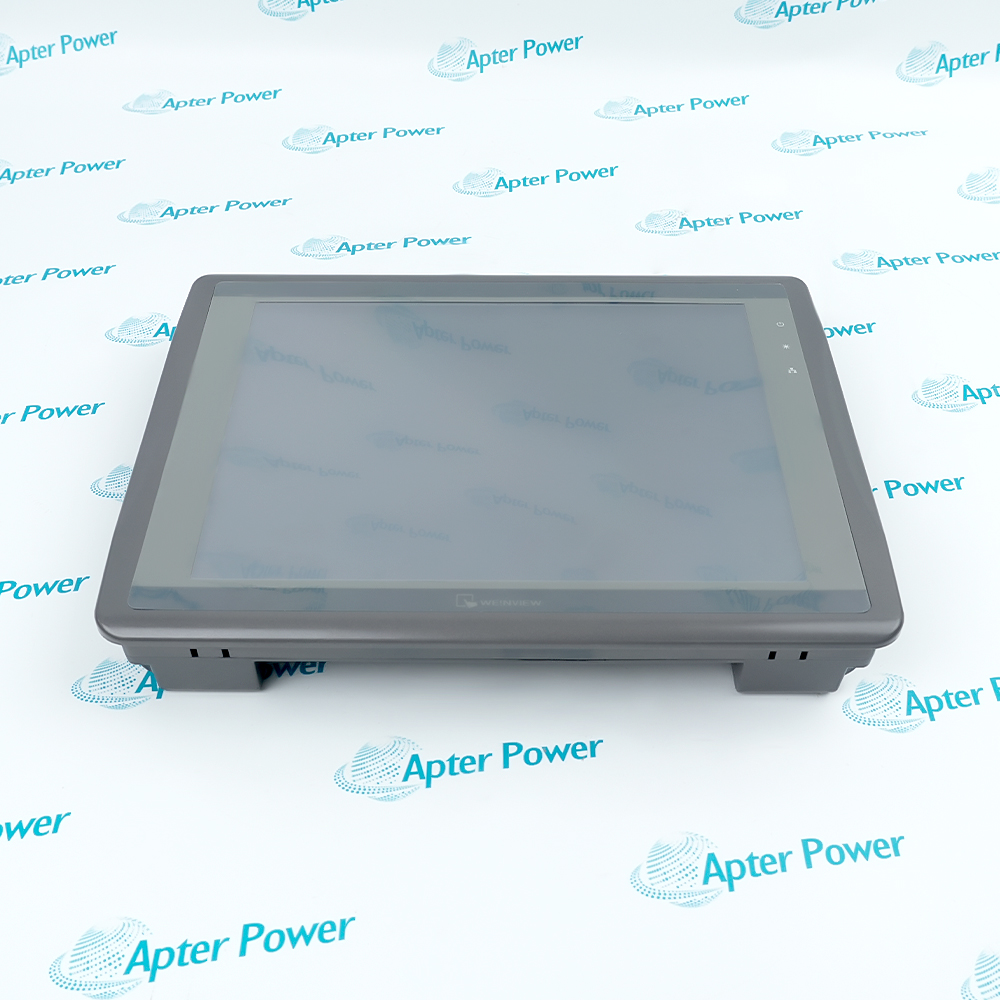
Weintek MT8121IE 12.1-inch HMI touch panel, front view of gray bezel and screen
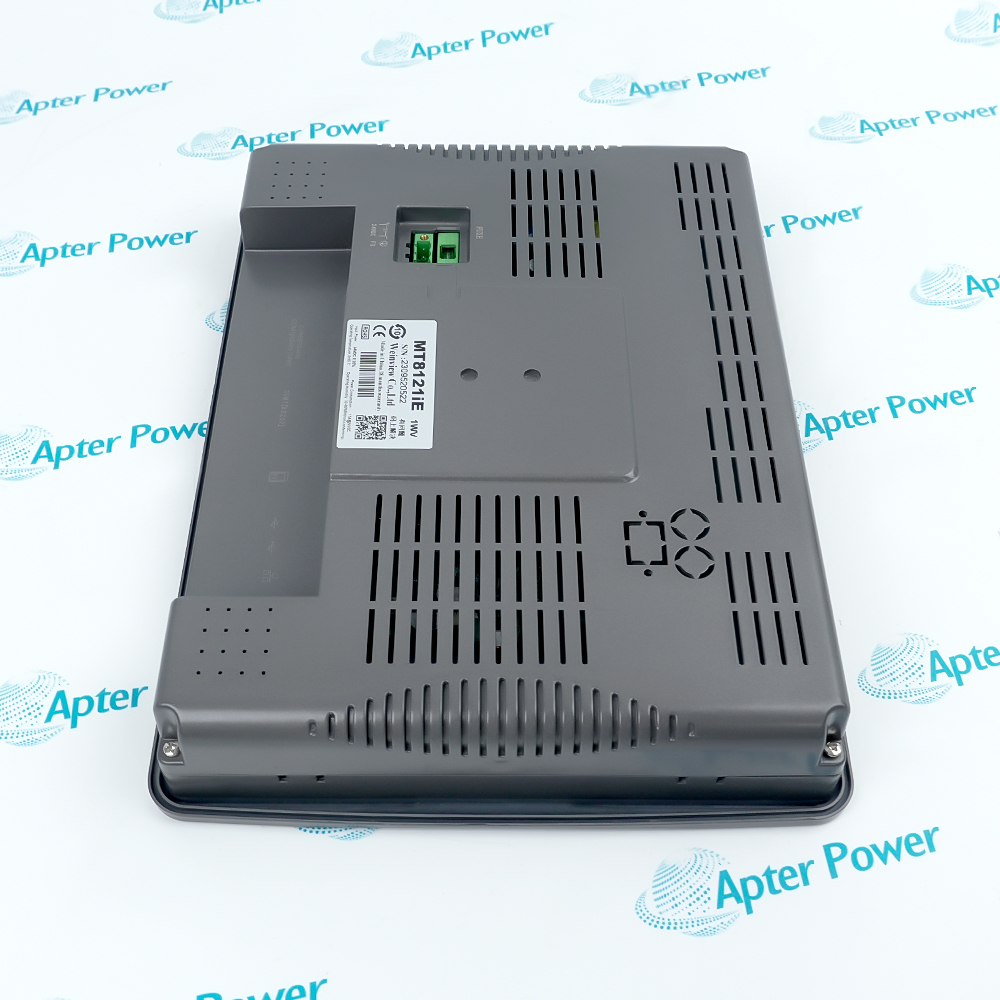
Weintek MT8121IE 12.1-inch HMI panel, rear view with product label and green power terminal
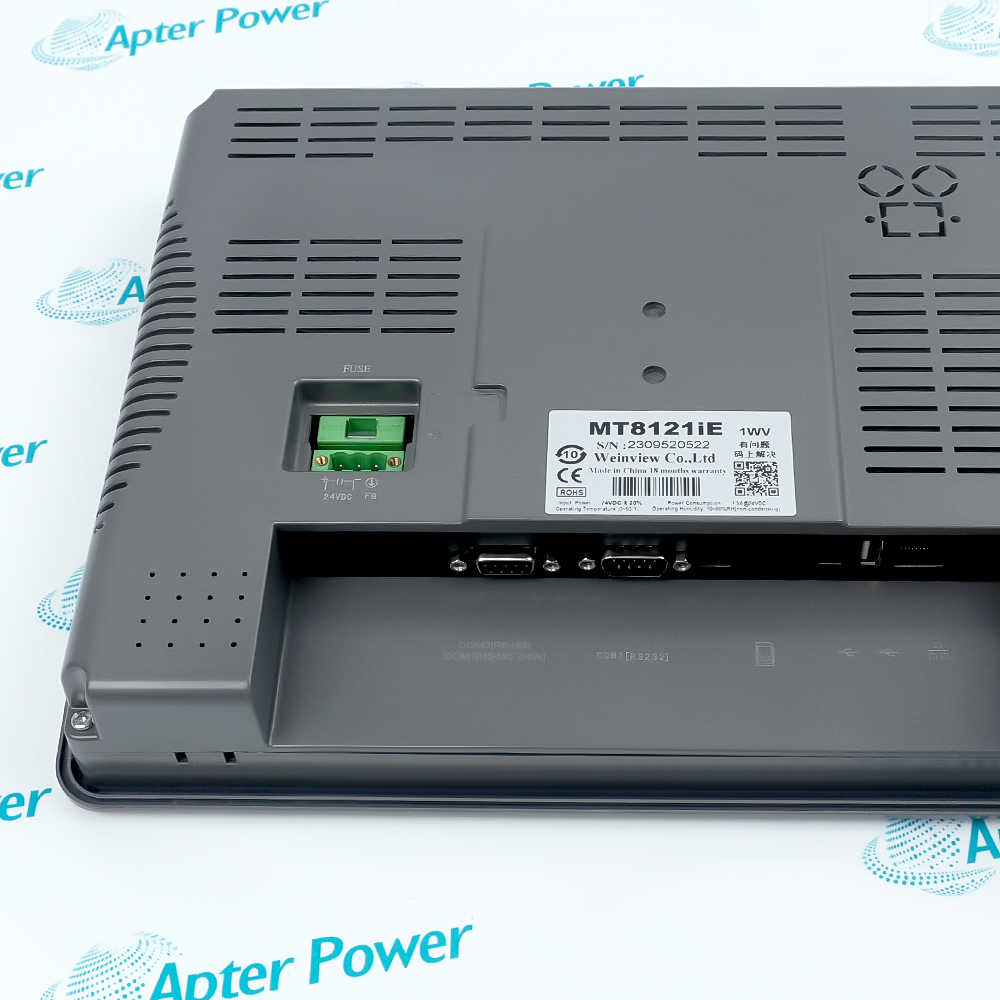
Weintek MT8121IE 12.1-inch HMI panel, close-up of rear label, power terminal and serial ports
Weintek MT8121IE 12.1-inch HMI touch panel, front view of gray bezel and screen
Weintek MT8121IE 12.1-inch HMI panel, rear view with product label and green power terminal
Weintek MT8121IE 12.1-inch HMI panel, close-up of rear label, power terminal and serial ports
Product image is representative; revision or series may vary. Contact us to request a specific version.

Product Describe:

Weintek MT8121IE, identified as MT8121iE in the manufacturer datasheet, is a 12.1-inch 1024 x 768 industrial HMI with resistive touch, a 600 MHz Cortex-A8 processor and serial, Ethernet, USB and SD interfaces.
Get a quick price for MT8121IE
E-mail *
Mobile *
Company
Content *
Quantity *
Upload (gif, jpg, jpeg, png, bmp, doc, docx, xls, xlsx, ppt, pdf, csv)
For more information on how your data is processed and stored by Apterpower please read our privacy policy

What happens after you enquire

  • 1

    Requirement review

    We review the part number, quantity and delivery requirements and ask for any missing details.
  • 2

    Quotation and availability

    We confirm the proposed item, condition, availability, price and estimated lead time in the quotation.
  • 3

    Order confirmation and dispatch

    Once the quotation and purchasing details are agreed, your contact will coordinate the order and available dispatch information.

Technical specifications for MT8121IE

  • Product Category:
    HMI Panels
  • Spare Part Number:
    MT8121IE
  • Estimated shipping dimensions:
    20x14.5x5.5cm
  • Weight:
    0.78 kg
  • Tariff Code:
    8537101190
  • Counliy of origin:
    China
  • Product type:
    Industrial HMI touch panel
  • Display:
    12.1-inch TFT
  • Display resolution:
    1024 x 768
  • Brightness:
    500 cd/m2
  • Contrast ratio:
    700:1
  • Backlight:
    LED, more than 50,000 hours
  • Display colors:
    16.2 million
  • Touch panel:
    4-wire resistive
  • Touch accuracy:
    Active area X and Y +/-2%
  • Flash storage:
    128 MB
  • RAM:
    256 MB
  • Processor:
    Cortex-A8 32-bit RISC, 600 MHz
  • SD card:
    SD / SDHC
  • USB host:
    USB 2.0 x 1
  • USB client:
    USB 2.0 x 1
  • Ethernet:
    1 x RJ45, 10/100 Base-T
  • COM1:
    RS-232 and RS-485 2-wire/4-wire
  • COM3:
    RS-485 2-wire
  • Serial isolation:
    COM1 and COM3 RS-485 dual isolation
  • MPI support:
    COM1 or COM3 RS-485 2-wire, 187.5K; use one at a time
  • RTC:
    Built-in
  • Input power:
    24 Vdc +/-20%
  • Power consumption:
    1000 mA at 24 Vdc
  • Power isolation:
    Built-in
  • Voltage resistance:
    500 Vac for 1 minute
  • Isolation resistance:
    More than 50 Mohm at 500 Vdc
  • Enclosure:
    Aluminum
  • Front protection:
    NEMA 4 / IP65
  • Operating temperature:
    0 to 50 deg C
  • Storage temperature:
    -20 to 60 deg C
  • Relative humidity:
    10% to 90% at 40 deg C, non-condensing
  • Cooling:
    Fanless
  • Certificate:
    CE
  • Engineering software:
    EasyBuilder Pro V4.00.01 or later

Information

Overview Manuals Common Applications Product Precautions
MT8121IE provides 12.1-inch industrial visualization, resistive touch operation and multi-interface controller communications for an EasyBuilder Pro project.
  • 12.1-inch 1024 x 768 TFT display
  • 4-wire resistive touch panel
  • 600 MHz Cortex-A8 processor
  • Isolated RS-485, Ethernet, USB and SD connectivity

The HMI must remain matched to the selected MT8121iE target, project file, controller drivers and every serial, Ethernet, USB and SD assignment. Commissioning verifies boot, communications, screen behavior, alarm functions and retained data.

Important Notice: Confirm MT8121IE/MT8121iE, EasyBuilder Pro target and project, 24 Vdc supply, protective earth, COM1/COM3 wiring and isolation, Ethernet addressing, USB/SD use and controlled interface-test evidence before commissioning.

Weintek MT8121IE Manuals & Downloads

These documents are different: the first consolidates model-specific technical and system data; the second is the official manufacturer datasheet for MT8121iE.


Machine visualization
Displays process values and documented operating states.
PLC operator station
Provides touch commands through configured controller drivers.
Alarm and data handling
Supports project alarms, logs, recipes and retained records.
Legacy panel replacement
Restores the exact MT8121iE target and interface setup.
Read the applicable Weintek installation instructions before work. Verify MT8121IE, the installed host system and all configured field interfaces before isolation, wiring or commissioning.
1
Confirm MT8121IE and the manufacturer MT8121iE identity on the label.
2
Place the machine and connected controller in the approved maintenance state.
3
Back up the EasyBuilder Pro project, recipes, logs and retained data.
4
Record 24 Vdc polarity, protective earth, COM1/COM3 modes, Ethernet, USB and SD use.
5
Isolate power and protect the resistive touch surface and all connectors.
6
Restore the MT8121iE project target, controller drivers, addresses and isolated serial assignments.
7
Review boot, CPU/COM indicators, communications and alarms after energization.
8
Test representative tags, commands, alarms, data entry and retained settings before release.

Alternative Names

MT8121iE Weinview MT8121iE Weintek MT8121iE

Technical notes

Use the manufacturer identity MT8121iE when selecting the EasyBuilder Pro target even when the commercial record is written MT8121IE. Back up the HMI project and retained data, and preserve 24 Vdc polarity, protective earth, isolated RS-485 assignments, Ethernet settings and SD/USB use.

FAQ View All FAQ

  • How is the exact MT8121IE execution identified?
    Match the commercial MT8121IE record to manufacturer model MT8121iE on the datasheet and HMI target selection.
  • What documented function does MT8121IE perform?
    It provides 12.1-inch visualization, resistive touch operation and configured controller communications.
  • Which installed system must be matched before fitting MT8121IE?
    Match the panel position, 24 Vdc supply, EasyBuilder Pro project, controller drivers and communication topology.
  • Which interfaces must be recorded for MT8121IE?
    Record protective earth, COM1/COM3 mode, Ethernet address, USB roles and SD-card use.
  • What handling controls apply to MT8121IE?
    Back up the project and data, isolate power and protect the touch surface and connectors.
  • What must be restored after installing MT8121IE?
    Restore the MT8121iE target, project, drivers, station addresses, alarms, recipes and retained data.
  • What evidence confirms MT8121IE is ready for service?
    Retain boot, indicator, touch, tag, command, alarm, communication and data-retention test results.
  • Which manufacturer record supports the MT8121IE page?
    Weintek's MT8121iE_DataSheet_ENG_131009 supplies the exact display, processing, interface, power and environmental specifications.
Manufacturers

You May Also Like

Explore related automation components available through Apter Power.
Manufacturers

Product Browsing History

Revisit the products you recently viewed on Apter Power.
SPEAK TO OUR TEAM
Let’s find the right solution for you.
Send us the part number, quantity and delivery destination. Our team will help confirm availability and lead time.
  • Whatsapp: +86 18030235313

    Send us a message.
  • sales13@apterpower.com

    Complete our online form.
  • +86 18030235313

    Speak to our team in your native language.