Speak to a sourcing specialist
sales13@apterpower.com
Get a quick price for MC-TDIA72
E-mail *
Mobile *
Company
Content *
Quantity *
Upload (gif, jpg, jpeg, png, bmp, doc, docx, xls, xlsx, ppt, pdf, csv)
For more information on how your data is processed and stored by Apterpower please read our privacy policy

What happens after you enquire

  • 1

    Requirement review

    We review the part number, quantity and delivery requirements and ask for any missing details.
  • 2

    Quotation and availability

    We confirm the proposed item, condition, availability, price and estimated lead time in the quotation.
  • 3

    Order confirmation and dispatch

    Once the quotation and purchasing details are agreed, your contact will coordinate the order and available dispatch information.

Technical specifications for MC-TDIA72

  • Manufacturer:
    Honeywell
  • Product Category:
    DCS Systems
  • Spare Part Number:
    51303930-150
  • Estimated shipping dimensions:
    46.2x12x5.5cm
  • Weight:
    1.32 kg
  • Tariff Code:
    8537101190
  • Counliy of origin:
    USA
  • Input channels:
    32
  • Nominal input:
    120 Vac
  • Input range:
    90 to 132 Vac
  • Frequency:
    47 to 63 Hz
  • Isolation:
    1500 Vac rms; +/-1500 Vdc
  • Isolation method:
    Optical
  • On current:
    5.2 mA minimum
  • Off current:
    1.47 mA maximum
  • Input delay:
    25 ms maximum
  • On field resistance:
    100 ohm maximum
  • Off field resistance:
    71 kohm minimum
  • Terminal type:
    Screw
  • Plug-in isolators:
    None

Information

Overview Manuals Common Applications Product Precautions
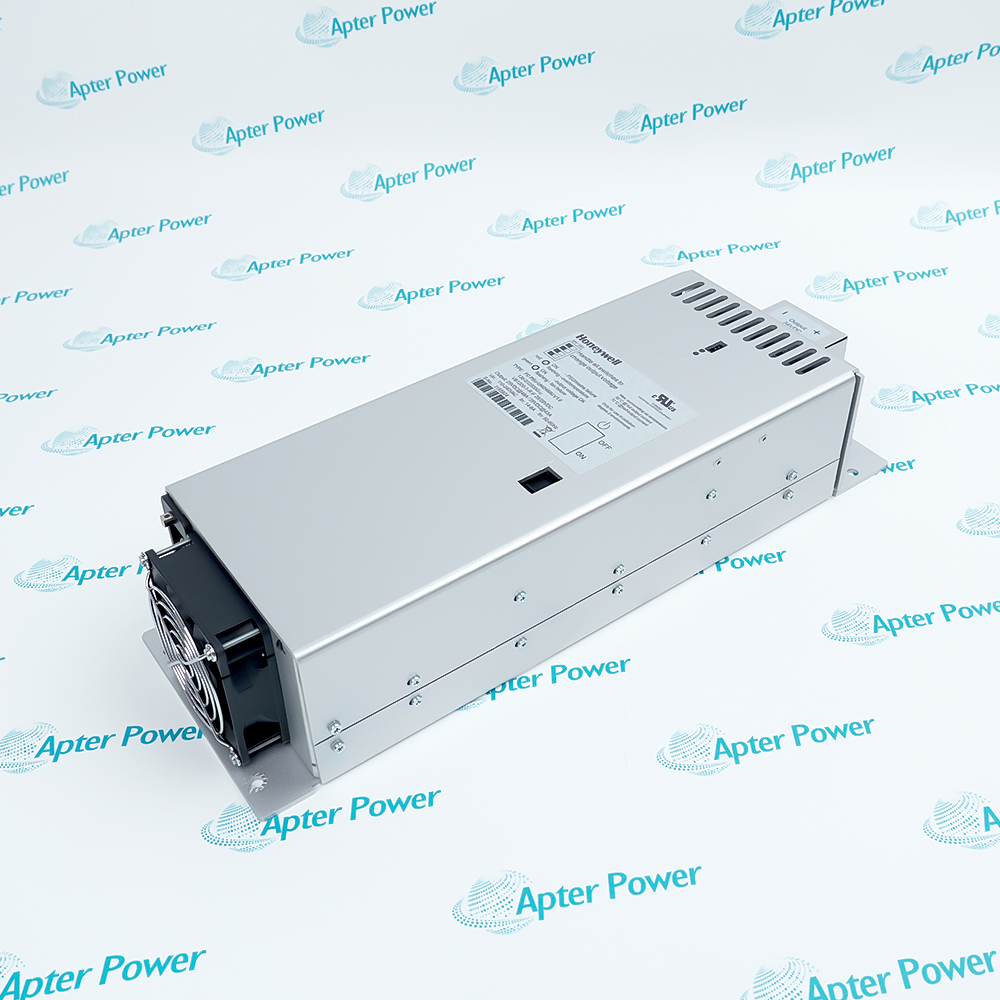
Honeywell MC-TDIA72 is a 32-channel 120 Vac digital-input field termination assembly. It optically isolates high-voltage field states and connects them to TPS Process Manager digital-input processing.
  • Terminates thirty-two high-voltage discrete inputs
  • Optically isolates field states from TPS electronics
  • Detects 120 Vac contact and powered-input conditions
  • Routes grouped digital status to the matched processor

MC-TDIA72 installs with TPS digital-input processor, FTA-to-IOP cable, 120 Vac field-contact circuits, Screw-terminal cabinet wiring in an engineered TPS Process Manager I/O configuration.

The commissioning workflow covers installed-hardware matching, controlled start-up and functional verification for this thirty-two-channel 120 vac digital input fta.

Important Notice: Confirm the complete MC-TDIA72 marking, installed-system configuration, field connections and controlled functional test before commissioning or replacement.


Apter Power MC-TDIA72 Manuals and Guides
Apter Power MC-TDIA72 Product Technical Reference PDFApter Power MC-TDIA72 Installation and Verification PDF
The first document is an Apter Power model-specific technical reference. The second supports model-specific installation, configuration and engineering verification.
Motor-starter running feedbackTerminates thirty-two high-voltage discrete inputs
Switchgear auxiliary contactsOptically isolates field states from TPS electronics
Heater and burner permissivesDetects 120 Vac contact and powered-input conditions
High-voltage package status inputsRoutes grouped digital status to the matched processor
Read the applicable Honeywell installation instructions before work. Verify MC-TDIA72 and the installed TPS Process Manager I/O configuration.
1Verify the complete MC-TDIA72 marking and its assigned TPS Process Manager I/O position before work.
2Isolate the energy associated with TPS digital-input processor before disconnecting MC-TDIA72.
3Protect the MC-TDIA72 connectors and electronic assembly using approved ESD controls.
4Record the as-found FTA-to-IOP cable connections and configured assignment before replacement.
5Confirm 120 Vac field-contact circuits matches the approved installation record for MC-TDIA72.
6Restore MC-TDIA72 under controlled conditions and review its model-specific diagnostics.
7Complete a documented functional test for motor-starter running feedback before release.

Technical notes

De-energize all 120 Vac inputs, segregate the wiring from low-voltage signals and verify every channel crosses the documented on/off thresholds before enabling interlocks.

FAQ View All FAQ

  • Which companion hardware must be checked when replacing MC-TDIA72?
    Verify TPS digital-input processor, FTA-to-IOP cable and 120 Vac field-contact circuits against the approved cabinet and project record before fitting the Thirty-Two-Channel 120 Vac Digital Input FTA.
  • What wiring information should be recorded before removing MC-TDIA72?
    Record terminal identifiers, polarity or phase, shields, cable tags and the as-found channel or port assignment for MC-TDIA72.
  • How should engineers validate MC-TDIA72 after configuration?
    Restore the documented TPS Process Manager I/O assignment, review diagnostics and run a controlled test of its role: terminates thirty-two high-voltage discrete inputs.
  • Can MC-TDIA72 be moved to a different slot or duty without review?
    No. Confirm keying, companion hardware and the approved configuration before assigning MC-TDIA72 to another position or function.
  • Which technical value is especially important during MC-TDIA72 commissioning?
    Verify Isolation is 1500 Vac rms; +/-1500 Vdc and use the named manufacturer procedure for the controlled functional test.
  • What should be checked if MC-TDIA72 does not support switchgear auxiliary contacts after installation?
    Check seating, FTA-to-IOP cable, 120 Vac field-contact circuits, field energy and the model-specific diagnostics before replacing additional hardware.
  • What evidence should be retained after MC-TDIA72 returns to service?
    Retain the full model identity, as-left connections, configuration, diagnostic result and the final controlled test record for motor-starter running feedback.
  • How is MC-TDIA72 identified before installation in a TPS Process Manager I/O cabinet?
    Match the full MC-TDIA72 marking and part number 51303930-150 to the assigned position and installed TPS digital-input processor.
Related reading

Related cases and sourcing guidance

View all case studies
SPEAK TO OUR TEAM
Let’s find the right solution for you.
Send us the part number, quantity and delivery destination. Our team will help confirm availability and lead time.
  • Whatsapp: +86 18030235313

    Send us a message.
  • sales13@apterpower.com

    Complete our online form.
  • +86 18030235313

    Speak to our team in your native language.