-
Match the complete marking
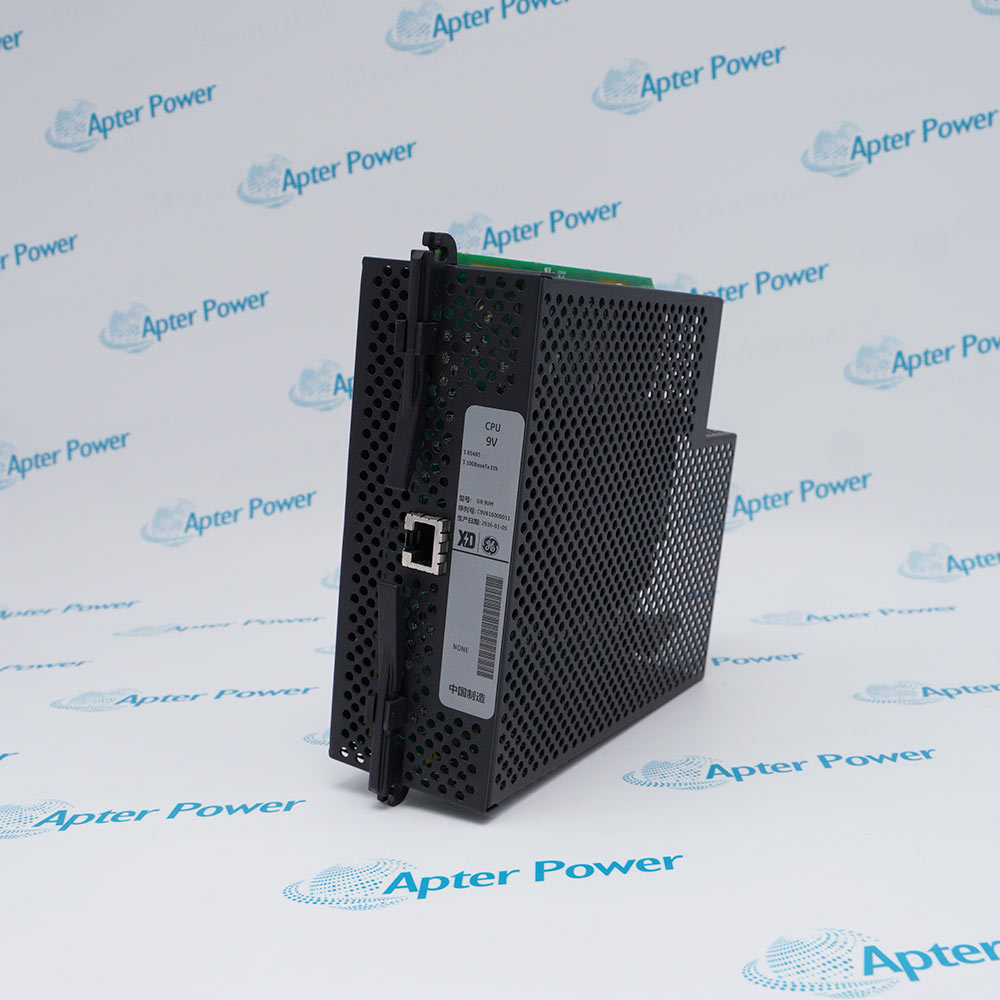
Record the complete UR9UH marking, hardware revision and installed SFP population. Compare them with the relay CPU slot and retain them on the enquiry and quotation.
-
Check the offered item before ordering
Request available label and port photos. Compare the offered UR9UH interface and connector arrangement with the installed relay and GE upgrade guidance before ordering.
Technical specifications for UR9UH
-
Manufacturer:General Electric
-
Product Category:General Automation
-
Spare Part Number:UR9UH
-
Weight:0.9 kg
-
Tariff Code:8537101190
-
CPU family:UR version 7
-
CPU type:U
-
RS485 channels:1
-
100Base-FX Ethernet ports:2, multimode SFP/LC
-
100Base-T Ethernet ports:1, SFP/RJ45
-
Independent Ethernet ports:3
-
Ethernet addressing:Independent MAC and IP per port
-
Published loose-module code:UR9U
Information
- The CPU processes protection, control and communication within a compatible UR relay. The relay chassis, installed firmware and communication transceivers must be considered together.
Network arrangement: Independent fiber and copper paths
Serial integration: Station equipment communication
Exchange focus: Firmware, relay settings and hardware revision
GE lists UR9U as a version 7 loose CPU option in its version 6 end-of-manufacturing notice. The older version 6 CPU types E, J, K and N reached the stated last-order date of 31 December 2022; replacing one with a version 7 CPU involves relay and firmware compatibility checks. The final H in UR9UH is part of the offered marking and should be matched to the installed unit.
Before an exchange, save the relay settings and communications configuration, identify all installed SFP media, and verify the relay firmware and other modules against the manufacturer’s upgrade guidance. After fitting, check CPU start-up, port link states, IP/MAC records, RS485 communication and every protection function affected by the outage.
-
GE Vernova UR CPU lifecycle excerpt
Original manufacturer excerpt - PDF, 2 pages. Version 6 CPU phase and UR9U version 7 replacement context. -
Apter Power installation guide for General Electric UR9UH
Prepared by Apter Power - PDF, 3 pages. Identification, installation checks, commissioning and fault isolation.
Application scope: Provide relay processing and serial/fiber/copper network interfaces for supported protection and station-automation functions.
-
Protection relay control
Run the installed UR relay’s approved protection, logic, event and control configuration. -
Substation fiber network
Connect two multimode LC 100Base-FX paths where the installed SFPs and network design support them. -
Copper station LAN
Use the independent RJ45 100Base-T path for the configured engineering or station network. -
Legacy serial integration
Retain the RS485 communications map and polarity when the relay exchanges data with serial equipment.
Export the complete approved relay configuration, firmware and event record before a CPU change.
A version 7 CPU replacement may require other module or firmware changes; check the GE upgrade path.
Identify the actual transceivers and LC/RJ45 media rather than assuming a port description proves an installed SFP.
Follow the relay maintenance procedure and ESD control when removing the CPU module.
Recheck independent MAC/IP assignments, fiber pair mapping and RS485 polarity after startup.
Run a controlled site acceptance plan for communication and the functions affected by CPU exchange.
Alternative Names
Technical notes
Installation relationship: The CPU must match the UR chassis, firmware, other modules and station network design.
Upgrade boundary: GE version 7 CPU guidance is separate from the legacy version 6 last-order notice.
Technical reference: GE Multilin GER-4459 UR revision 7.01 release notes; GE Vernova GER-4900B version 6 CPU end-of-manufacturing notice.

FAQ View All FAQ
-
Why does replacing a version 6 CPU with UR9UH need a firmware review?GE identifies UR9U as a version 7 CPU option and warns that upgrading earlier CPUs can require additional hardware and compatible firmware. Record the complete relay order code and approved firmware before scheduling the change.
-
How are the three Ethernet paths on UR9UH distinguished?Type U has two multimode 100Base-FX SFP/LC paths and one 100Base-T SFP/RJ45 path, each with its own MAC and IP address. Document the actual fitted SFPs and network assignments.
-
Can UR9UH be accepted only because the fiber links illuminate?No. Link light proves only a physical connection. Verify relay CPU health, IP configuration, protocol traffic, time synchronization and the protection application after restoration.
-
What should be recorded before removing UR9UH from a UR relay?Capture the exact CPU and chassis markings, firmware, settings file, SFP types, Ethernet addresses, RS485 wiring, event records and pre-change alarm state.
-
How should RS485 be commissioned after fitting UR9UH?Verify polarity, common and shield arrangement, serial settings and end-of-line termination against the relay system drawing, then test communication with the actual host.
-
Does the type-U description guarantee that UR9UH includes SFP transceivers?No. The GE interface description identifies the supported port mix. The quotation should separately confirm the transceivers and any patch leads supplied with the physical module.
-
What can prevent network communication after replacing UR9UH?Check that each Ethernet port retains its assigned MAC/IP record, that the fitted SFP matches the fiber path, and that the relay firmware and station switch settings support the restored configuration.
-
What is an appropriate post-change test for UR9UH?Confirm startup diagnostics, each Ethernet and RS485 path, settings checksum, event time and representative protection input/output tests under the site-approved outage plan.
Supporting new and legacy automation
-
Please try to be as accurate as possible with your search.
-
We can quote you on 1000s of specialist parts, even if they are not listed on our website.
-
We can't find any results for “”.
Related cases and sourcing guidance
View all case studiesYou May Also Like
Product Browsing History
-
Whatsapp: +86 18030235313
Send us a message. -
sales13@apterpower.com
Complete our online form. -
+86 18030235313
Speak to our team in your native language.