Get Parts Quote
Name
Company *
Phone *
Email *
Address
City
State / Province / Region
Zipcode
Country
Quantity *
Part Number *
Manufacturer
Preferred Condition
Additional Information
Cancel

DS200TCDAH1BGD

Digital I/O Board
In Stock
Ships by Wednesday, October 14
Fast Shipping Available

Product Describe:

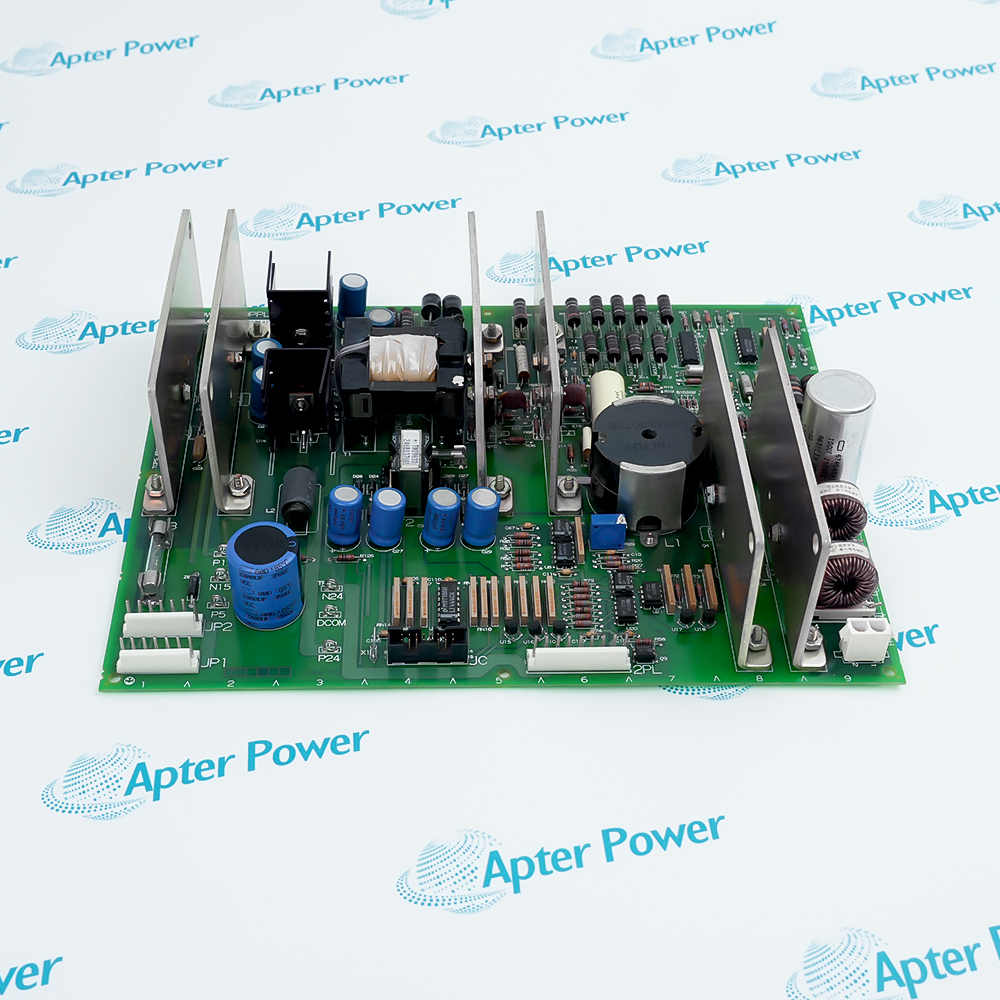
GE DS200TCDAH1BGD is a TCDA digital I/O board for the SPEEDTRONIC Mark V control platform. The TCDA function processes contact input and relay-output signals within the digital I/O architecture.

Ask our team:

Get a quick price for: DS200TCDAH1BGD
Quantity*
Upload (gif, jpg, jpeg, png, bmp, doc, docx, xls, xlsx, ppt, pdf, csv)
For more information on how your data is processed and stored by Apterpower please read our privacy policy.

Technical specifications for DS200TCDAH1BGD

Technical specifications for DS200TCDAH1BGD

  • Manufacturer:
    General Electric
  • Product Category:
    Gas turbine control
  • Spare Part Number:
    DS200TCDAH1BGD
  • Estimated shipping dimensions:
    28x21.3x2cm
  • Weight:
    0.38 kg
  • Tariff Code:
    8537101190
  • Counliy of origin:
    USA
  • Functional acronym:
    TCDA
  • System platform:
    SPEEDTRONIC Mark V
  • Board function:
    Digital contact I/O
  • Input terminal boards:
    DTBA / DTBB
  • Relay output boards:
    TCRA
  • Communication network:
    IONET
  • Power interface:
    JP
  • Input connectors:
    JQ / JR
  • Output connectors:
    JO1 / JO2
  • IONET connectors:
    JX1 / JX2

Information

Information

Overview Manuals Common Applications Product Precautions
GE DS200TCDAH1BGD is a TCDA digital I/O board for the SPEEDTRONIC Mark V control platform. The TCDA function processes contact input and relay-output signals within the digital I/O architecture.
  • Conditions digital contact inputs from DTBA and DTBB.
  • Routes contact-output signals to TCRA relay boards.
  • Time-tags contact-state changes for IONET transfer.
  • Uses application-specific IONET addressing and termination.

Match the TCDA board to its installed digital I/O core, terminal-board wiring and IONET address. Preserve the application-specific jumper configuration when replacing the board.

Important Notice: Verify the complete model, installed assembly and application records before replacement. Unverified revision-specific ratings are not stated.

GE DS200TCDAH1BGD Manuals & Downloads
Technical Reference — GE DS200TCDAH1BGDInstallation & Commissioning Guide — GE DS200TCDAH1BGD

These ApterPower reference documents summarize documented functions and service checks. Use the applicable manufacturer manual and unit-specific drawings for the installed equipment.

Turbine contact monitoring
Acquires discrete contact states through DTBA and DTBB in the Mark V digital I/O architecture.
Relay signal routing
Carries contact-output signals to the configured TCRA relay-board positions.
Event-state tracking
Conditions and time-tags changing contacts before transferring the information through IONET.
Mark V I/O maintenance
Supports restoration of the installed digital I/O path with matching wiring, address and jumper records.
Service GE DS200TCDAH1BGD within its documented system context. Follow the installed unit’s isolation and maintenance procedures.
1
Isolate the installed control equipment before disconnecting TCDA wiring.
2
Record JQ and JR cabling to DTBA and DTBB before removal.
3
Identify JO1 and JO2 paths; output usage depends on the installed core.
4
Preserve JX1/JX2 IONET cabling and the shielded twisted-pair arrangement.
5
Match J4, J5 and J6 to the installed IONET ID record.
6
Keep J2 and J3 termination settings consistent with the network configuration.
7
Treat J1 and J8 as factory-test positions; do not alter them by assumption.
8
Check the J7 stall-timer setting and HMI contact-inversion constants against the application record.

Technical notes

Technical notes

Match the TCDA board to its installed digital I/O core, terminal-board wiring and IONET address. Preserve the application-specific jumper configuration when replacing the board.

FAQS

  • Which terminal boards supply contact inputs to GE DS200TCDAH1BGD?
    TCDA receives the contact input signals from DTBA and DTBB through JQ and JR.
  • How are relay-output signals routed from GE DS200TCDAH1BGD?
    JO1 and JO2 carry the contact-output signals to TCRA relay boards; the installed core determines which output paths are used.
  • How does GE DS200TCDAH1BGD communicate within the digital I/O system?
    The TCDA signal path uses IONET through JX1 or JX2. Match the installed network wiring and termination arrangement.
  • Where is contact inversion configured for GE DS200TCDAH1BGD?
    Contact-input inversion is set by the application I/O configuration constants in the HMI configuration editor.
  • Which jumper settings affect the IONET identity of GE DS200TCDAH1BGD?
    The TCDA configuration uses J4, J5 and J6 for the IONET ID; preserve the address required by the installed system.
  • What does GE DS200TCDAH1BGD do when a contact changes state?
    TCDA conditions the input and time-tags the state change before transferring the information over IONET.
  • Which GE DS200TCDAH1BGD jumpers require special care during replacement?
    J1 and J8 are factory-test positions, J2 and J3 relate to termination, and J7 enables the stall timer. Use the unit-specific jumper record rather than changing these positions by assumption.
Trusted by 5,000+ plants worldwide | Backed by our vast inventory of top-tier control parts, modules and cards, fast shipments are dispatched to cover your urgent needs. ABOUT US >>
Disclaimer: We are not an authorized distributor or distributor of the product manufacturer of this website, The product may have older date codes or be an older series than that available direct from the factory or authorized dealers. Because our company is not an authorized distributor of this product, the Original Manufacturer`s warranty does not apply.While many DCS PLC products will have firmware already installed, Our company makes no representation as to whether a DSC PLC product will or will not have firmware and, if it does have firmware, whether the firmware is the revision level that you need for your application. Our company also makes no representations as to your ability or right to download or otherwise obtain firmware for the product from our company, its distributors, or any other source. Our company also makes no representations as to your right to install any such firmware on the product. Our company will not obtain or supply firmware on your behalf. It is your obligation to comply with the terms of any End-User License Agreement or similar document related to obtaining or installing firmware.

Product Browsing History

We’re Here When You Need Us

From product insights to customer service needs, our experienced service team will focus on getting you what you need quickly

Enquire

Complete our online form.

Call Us

Speak to one of our team.

Live Chat

Send us a message.