Schneider Electric’s Unity Pro, now branded as EcoStruxure Control Expert, sits at the heart of many industrial and commercial power systems. It is the programming environment for Modicon M340 and related controllers that supervise UPS systems, inverters, switchgear, and critical distribution. When Unity throws an error or a PLC drops into HALT, you are no longer looking at a “software annoyance”; you are staring at a direct threat to power reliability, uptime, and safety.
As a power system specialist, I have seen medium-size facilities go from stable operation to emergency generator runs simply because a programming fault or communication misconfiguration in Unity took out the brains of a perfectly healthy UPS plant. The difference between a nuisance event and a cascading outage often comes down to how quickly and systematically you interpret error codes, correlate them with controller diagnostics, and apply proven resolution patterns.
This article walks through Schneider Unity error behavior as it relates to Modicon M340 and similar platforms, using details drawn from Schneider Electric documentation and real-world case studies. The focus is practical: what the different error categories really mean, how to approach problematic messages like “Exchange list generation fail: Code generation failure” and STMSDK COM initialization errors, and how to keep communication faults from masquerading as controller failures in your power system.
How Unity and M340 Represent Errors
IEC 61131-3 context and execution model
Unity Pro is an IEC 61131-3 compliant environment. That matters because it constrains how logic is structured and executed. Under the hood, your function blocks, ladder networks, and sequential charts are compiled into an application that runs cyclically on the M340 CPU. The controller’s firmware handles startup autotests, monitors I/O and communication modules, and supervises the execution of each instruction.
An important implication from the IEC 61131-3 mindset, reinforced by standard programming references on industrial automation, is that many errors are deterministic and tightly bound to particular instructions or tasks. When Unity reports a programming error or the PLC flags a blocking fault, the goal is not to guess, but to trace back to the specific network or function block instance that triggered it.
Error categories on Modicon M340
Schneider Electric’s M340 troubleshooting guidance makes it clear that not all errors are created equal. On these controllers, faults are grouped into three broad categories: non-blocking errors, blocking errors, and processor or system errors.
Non-blocking errors indicate conditions that the system can tolerate without stopping task execution. The CPU continues to run, but you may see diagnostics in status words or the Unity animation table that warn about communication hiccups, peripheral anomalies, or out-of-range values. In a power system context, these are the early warning signs that let you intervene before a nuisance becomes a trip.
Blocking errors sit in the middle. According to the M340 documentation, these are caused by the application program itself rather than by the hardware platform. When a blocking error occurs, the controller does not report a separate “system error,” but it does halt all tasks and drives the PLC into HALT mode. On the front panel, you typically see the ERR LED flashing, often in combination with the RUN LED, signaling that logic has been stopped on purpose to avoid executing invalid instructions.
Processor and system errors sit at the top of the hierarchy. These relate to hardware failures or fundamental firmware issues detected during startup autotests or runtime self-checks. In many industrial and commercial power applications, these are the events that trigger your most conservative interlocks: if the controller cannot trust itself, the rest of the system should assume the worst until you prove otherwise.
The practical takeaway is that understanding which category you are dealing with changes your response. Non-blocking errors call for prioritization and monitoring. Blocking errors demand a deliberate reset and code review. System errors justify immediate containment actions on generators, static transfer switches, or critical loads.
Diagnostic words, bits, and LEDs
Schneider’s M340 reference material provides concrete hooks for troubleshooting at the instruction level. Three system words are particularly important for programming-related faults:
| Diagnostic item | Description | Practical use in fault resolution |
| %SW125 | Encodes the specific blocking error type. | Tells you what kind of programming mistake occurred, such as an illegal operation or out-of-range reference, so you can look up the meaning in the controller documentation. |
| %SW126 | Contains part of the address of the instruction that caused the blocking error. | Used together with %SW127 to locate the exact network or function block instance that triggered the fault inside Unity. |
| %SW127 | Contains the remaining address portion of the faulting instruction. | Completes the pointer to the faulty instruction, letting you jump straight to the problematic code rather than hunting through the entire project. |
When a blocking error occurs, the controller also allows you to recover in a controlled way. The M340 guide explains that setting system bit %S0 to 1 reinitializes data, stops tasks at the end of the cycle, refreshes the input image, and drives outputs to their configured fallback positions. Only then can you safely restart the application with a RUN command. For a UPS or inverter system, those fallback positions are the difference between a clean transfer and a confused set of breakers; they should be engineered deliberately, not left to default.
Front panel LEDs complete the picture. CPU and communication module indicators show whether you are dealing with a hardware, I/O, network, or application-layer issue. Good practice in a power room is to teach operators how to read these LEDs side by side with Unity error messages; otherwise, a purely software-looking problem might actually be a wiring, module, or network condition.
Common Programming Software Faults and What They Tell You
“Exchange list generation fail: Code generation failure”
Schneider Electric publishes a technical FAQ under the title “Unity error message: ‘Exchange list generation fail: Code generation failure.’” The captured text available here includes the heading and consent language for marketing communications, but not the detailed fix instructions. Even with that limitation, the wording of the error itself reveals how you should think about it.
The key phrase is “code generation failure.” In IEC 61131-3 tools like Unity, the build process has a stage where the software generates exchange lists, symbolic tables, and internal representations that sit between your graphical logic and the PLC’s executable code. A failure at this point indicates that Unity cannot produce valid runtime code from the current project configuration.
From a reliability standpoint, the important point is that this is a build-time error, not a runtime surprise. Unity is telling you, before download, that something about the project as written does not translate into a safe, deterministic set of instructions. In a power system environment, the right response is to treat this as a red light: you do not push a project with unresolved code generation failures into a live UPS or switchgear controller.
Without the full text of the Schneider FAQ, we cannot cite specific menu paths or checkboxes. However, a disciplined approach is still possible. First, you trap the error by building consistently before transferring to the PLC. Second, you treat any persistent code generation failure as a change-management issue: the last modification to data types, communication objects, or hardware configuration is the first place to review. Finally, you escalate quickly to Schneider Electric support once you have a reproducible case, so they can provide vendor-specific guidance on the internal conditions that make this error appear.
STMSDK COM object initialization errors
Two Schneider Electric FAQ entries, identified as FA304997 and FA381483, refer to Unity Pro and EcoStruxure Control Expert errors of the form “Error when initializing programming unit (STMSDK COM object initialization)” or closely similar wording. The locally captured content again includes only titles and a privacy notice, but the research notes summarize the domain understanding behind this class of problem.
Unity Pro on Windows relies on Component Object Model (COM) objects for internal services. STMSDK is one of those components, responsible for aspects of the programming unit initialization and device access. When Unity reports that it cannot initialize the STMSDK COM object, it is not complaining about your ladder logic. It is telling you that part of its own infrastructure is not healthy.
By design, a COM object must be properly installed and registered in the Windows registry so that applications can create and use it. Initialization failures therefore often trace back to problems such as incomplete or corrupted Unity installations, missing or damaged libraries associated with STMSDK, or version conflicts introduced by other Schneider or third-party software that installed overlapping components.
Permissions and security posture are also common contributors. The summarized Schneider research highlights that running Unity without adequate local administrative rights, applying restrictive group policies, or deploying aggressive antivirus and endpoint security tools can all interfere with COM registration and execution. In many regulated power environments, security hardening is performed by separate IT teams; from a reliability perspective, that means you must bring them into the loop when these errors appear.
Typical remedies in similar Schneider contexts include repairing or reinstalling Unity Pro or Control Expert, ensuring all required Windows updates and redistributables are installed, and explicitly re-registering affected COM components where supported by Schneider’s guidance. Just as important, you validate that the user account used for programming has the necessary rights and that security software is configured not to quarantine or block Unity components.
In power system commissioning, my practice is to treat STMSDK initialization failures as environmental issues, not project issues. Before blaming the PLC application, I verify whether the problem reproduces on another engineering workstation. If it disappears on a clean machine, the diagnosis is clear: you fix the environment first so you are not chasing ghost faults in the logic.
Application-level blocking errors in M340
While the previous two examples live mostly on the engineering workstation, blocking errors in M340 controllers are firmly rooted in the application code. Schneider’s M340 troubleshooting guide states that blocking errors are caused by the program and that they immediately halt all tasks, placing the PLC into HALT mode. The front-panel ERR LED flashes, and Unity’s status view confirms the error state.
For a power system, this is serious. A blocking error during a transfer sequence can freeze interlocks halfway through, leaving tie breakers open or static transfer switches waiting for logic that will never run. That is why the combination of %SW125 for error type and %SW126–%SW127 for the faulting instruction address is so valuable. Instead of guessing whether an array overrun, a division by zero, or an illegal conversion is at fault, you can jump directly to the offending instruction and reason from the real code.
The recovery mechanism via bit %S0 is equally important. When you set %S0 to 1 according to Schneider’s guidance, the PLC reinitializes internal data, stops tasks cleanly, refreshes input images, and drives outputs to pre-defined fallback positions before you can issue a RUN. In a UPS or inverter-based system, engineering those fallback states to meet safety and reliability goals is part of your job as a power specialist. A good practice is to test blocking-error scenarios in a controlled environment so you know exactly how breakers, contactors, and bypass paths will behave in a HALT.
Communication and Messaging Issues Misread as Unity Faults
Ethernet messaging in practice: groundwater remediation case study
A particularly instructive case study described by Hallam-ICS involves a groundwater remediation project built around Schneider Unity Pro and Modicon M340 PACs. Multiple treatment facilities and remote wells were tied together over a new cellular network. The operational requirement was straightforward: local HMIs needed to command remote wells and verify that central treatment plants were ready to accept water. In practice, the team faced intermittent communication failures between sites with no obvious pattern. Cellular modem diagnostics and the carrier’s support ruled out the wide-area network as the culprit.
The root cause turned out to be an antipattern in the Unity logic itself. All Ethernet messages, implemented via the READ_VAR and WRITE_VAR function blocks, were being executed concurrently in one Function Block Diagram routine called every minute. On a high-latency, variable-quality cellular network, this approach overloaded the communication path and created race conditions and timeouts. To the inexperienced eye, the symptoms could easily be misattributed to modem firmware issues or even Unity software instability.
The recommended practice, backed by that project’s experience, was to sequence Ethernet messages one at a time. Instead of firing every READ_VAR and WRITE_VAR in a single scan, a Sequential Function Chart was used to trigger one message, wait for completion (success or failure), then move to the next. This pattern respects the realities of remote networks: each message gets a clear window to succeed or fail, and diagnostic information is easier to interpret.
Modicon’s implementation of READ_VAR and WRITE_VAR adds one more nuance. These blocks do not expose a simple “done” or “error” bit. Instead, they use a four-integer Exchange Management Table containing message state and communication diagnostics. In the Hallam-ICS solution, a Derived Function Block was created to unpack each byte of this table into user-friendly registers, including an activity indicator and a communications report word. That design allowed the SFC to decide whether to transition, set a communication failure bit, or alert operators.
From a power reliability standpoint, the beauty of this approach is in the failure handling. When a message failed, the SFC set a communications failure flag that interlocked upstream equipment and triggered local alarms and email notifications. Instead of blindly continuing to start pumps or close breakers based on stale data, the system would hold and demand attention. That is exactly what we want in critical power systems where remote data drives load transfers or battery charging decisions.
Modbus TCP/IP I/O scanner constraints
Another frequent source of confusion comes from Modbus TCP/IP communications configured through Unity’s I/O Scanner. A Schneider community discussion highlights several practical constraints that can turn a misconfiguration into what looks like a programming or controller fault.
The Unity I/O Scanner initially attempts to use Modbus function code 23, which performs combined read and write of multiple registers. If the target device does not support function 23, the scanner falls back to using function codes 4 (Read Input Registers) and 16 (Write Multiple Registers) to achieve similar behavior. This matters when you connect to third-party devices. If the device’s Modbus implementation is limited or quirky, Unity’s default behavior can result in rejected requests that manifest as timeouts or error indications in your application logic.
The I/O Scanner also only operates on Modbus 4x holding registers. It does not directly handle the other Modbus register types (0x coils, 1x discrete inputs, or 3x input registers) in this mechanism. When a site engineer assumes that any register address from the vendor’s manual will work and configures 0x or 3x locations into the 4x scanner, the resulting behavior can be unpredictable. From the Unity side, you see communication errors. From the device side, the messages may be considered invalid.
Unit ID is another subtle but critical parameter. For Modbus TCP/IP, the Unit ID behaves similarly to a slave address and is especially important when there are gateways or bridges involved. Schneider notes that valid IDs run from 1 to 255, but some devices will not respond to 255. Selecting a value in the 1 to 254 range is often safer, particularly when you are routing traffic through protocol converters. A mismatch between Unity’s configured Unit ID and the device’s expectations results in silence that looks very much like a network or controller problem if you are not paying attention.
Address ranges and register gaps complete the picture. The community example describes a read from 400001 to 400010 being rejected because register 400005 simply does not exist in the target controller. Instead of receiving a partial dataset, Unity gets an error. The fix is straightforward: ensure that the start and end addresses you configure in the I/O Scanner correspond exactly to fully implemented registers with no holes.
In all of these cases, tools like Wireshark provide decisive evidence. Capturing Modbus TCP/IP traffic lets you see whether devices are rejecting messages with error responses, ignoring them altogether, or never receiving them due to addressing problems. The important point for power system teams is that many “Unity communication errors” are actually configuration mismatches that can be diagnosed and corrected without touching the core power control logic.

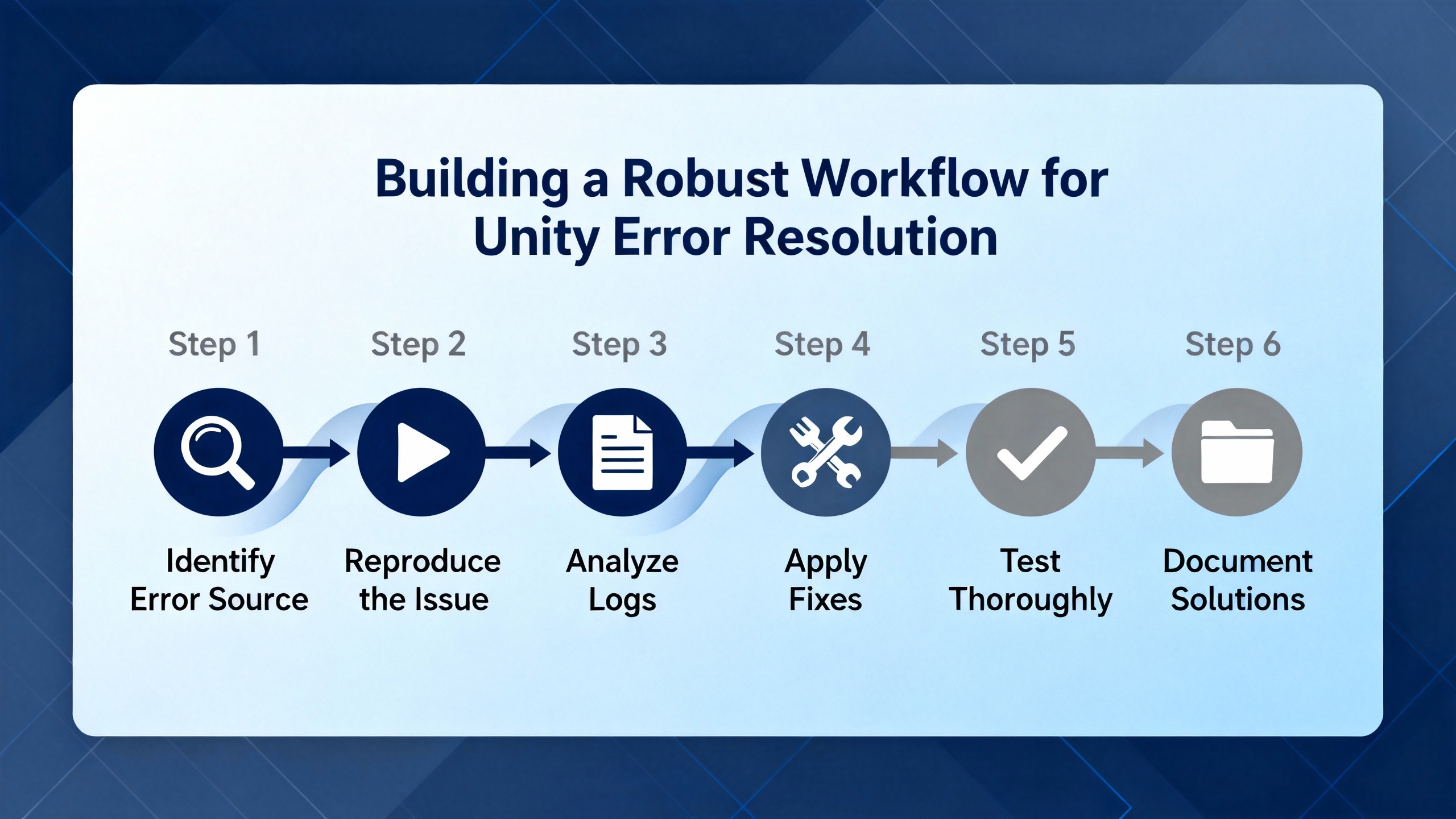
Building a Robust Workflow for Unity Error Resolution
In high-availability power applications, the cost of trial-and-error troubleshooting is measured in generator run hours and risk to critical loads. A structured workflow for Unity error resolution helps you keep the process disciplined and auditable.
The first step is always to capture the full context. That means noting the exact Unity error message text, recording CPU and module LED states from the controller front panels, and saving relevant system words such as %SW125, %SW126, and %SW127 when blocking errors occur. In many facilities I advise, technicians are trained to take quick photos of controller racks and Unity screens at the time of the event so nothing is lost.
Next, classify the error by category. If Unity refuses to build the project and reports a message like “Exchange list generation fail: Code generation failure,” you are in the realm of build-time faults on the engineering workstation. If the PLC has dropped into HALT with a flashing ERR LED and Unity reports a blocking error, you are dealing with an application-level fault on the controller. If communication blocks or I/O Scanners are reporting errors while the CPU stays in RUN, you are likely dealing with network or mapping misconfigurations.
Once you have that classification, decide on the immediate operational response. For blocking errors on a live power system, your focus is on moving the plant to a known safe state, which may mean transferring loads, placing UPS units into bypass, or locking out automatic sequences while you investigate. The M340 behavior of driving outputs to fallback positions after a %S0 initialization is part of this response; it should be tested in non-critical conditions so that both electrical and controls teams know exactly what to expect.
For workstation-side errors such as STMSDK COM initialization issues, the priority is different. Your plant might be running fine on an existing application, but you are temporarily unable to modify or download new logic. In that case, you schedule maintenance windows to repair or reinstall Unity Pro or Control Expert on the engineering station, coordinate with IT to adjust security policies if needed, and confirm that the fix is stable before touching any live controller.
Communication-related issues, whether in Ethernet messaging or Modbus I/O scanning, sit in between. You may choose to reconfigure messaging sequences to follow the proven “one message at a time” approach, especially on high-latency links. You verify Modbus function code support in third-party devices, confirm that only 4x registers are used with the I/O Scanner, validate Unit IDs, and test new register ranges in isolation before reintegrating them into critical sequences.
Throughout this process, documentation is not an afterthought. For each Unity error you encounter, you log the message text, category, root cause, and remediation steps, and you reference the relevant Schneider Electric manuals or FAQs by identifier. Over time, this builds a local knowledge base that lets your team respond faster the next time a similar code appears.
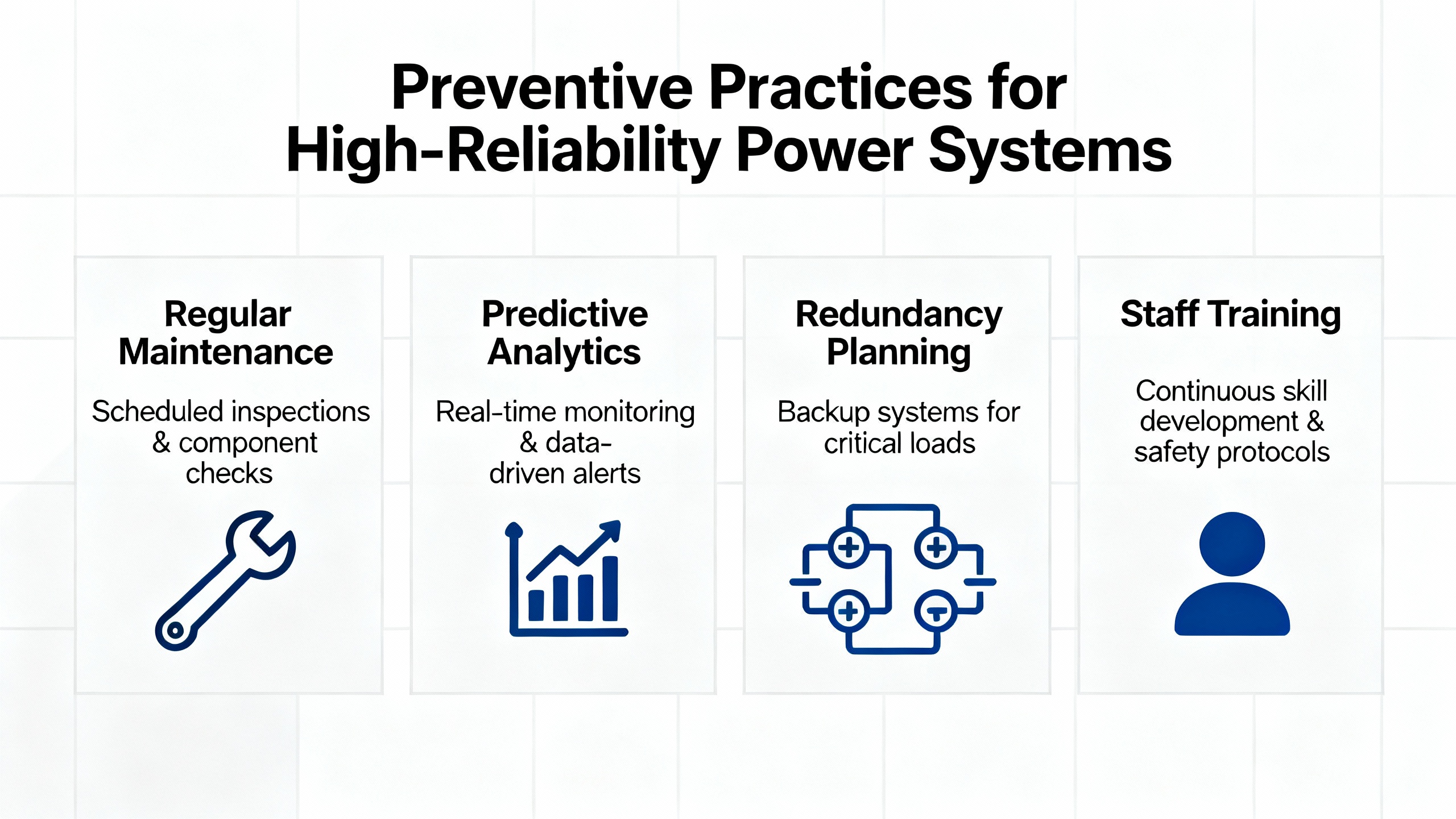
Preventive Practices for High-Reliability Power Systems
The best way to handle Unity error codes is to avoid generating them during critical operations in the first place. That does not mean bugs will never happen, but it does mean designing your control architecture and procedures with graceful failure in mind.
At the logic design level, avoid the temptation to cram all communication or complex calculations into single cyclic routines. The Hallam-ICS groundwater project shows that even when a network and hardware platform are sound, a design that issues many Ethernet messages at once can create self-inflicted communication problems. Sequential Function Charts and Derived Function Blocks for diagnostic decoding are not luxuries; they are disciplined patterns that isolate faults and make behavior predictable.
For Modicon M340 controllers, take the time to define and test fallback positions for all outputs that affect power paths. When blocking errors or system reinitialization occur and %S0 is used to reset the CPU, these fallback states are what stand between you and an unintended transfer or load loss. That means coordinating control logic with protective relay settings and mechanical interlocks, not treating them as separate domains.
On the engineering workstation side, treat your Unity Pro or Control Expert installation as critical infrastructure. Maintain at least one well-managed programming machine with controlled updates and documented security policies, so that COM-based components like STMSDK remain stable. Before major upgrades, such as new Unity versions or operating system patches, schedule test windows with non-critical controllers to validate that no new initialization or code-generation issues appear.
Finally, align your change management process with the realities of industrial power systems. Do not push major application changes or Unity upgrades during peak production or immediately before US holidays when staffing is thin and vendor support may be slower. Require that every code change be built and downloaded first to a test or simulation environment when possible, and that error-free builds be confirmed before touching live controllers.
Short FAQ: Unity Errors in Power Applications
Does a Unity error code mean my UPS or inverter will immediately trip?
Not necessarily. Many Unity errors occur on the engineering workstation during build or download and have no direct effect on a running controller. However, blocking errors on an M340 CPU or system errors detected at startup can force the PLC into HALT and drive outputs to fallback states. In critical power applications, those fallback states must be engineered and tested so that even a halted controller leaves the electrical system in a safe, predictable condition.
What information should I capture before calling Schneider Electric support?
Capture the exact error message text from Unity, the controller model and firmware version, the Unity or Control Expert software version, current values of diagnostic system words such as %SW125, %SW126, and %SW127 for blocking errors, LED states on the CPU and communication modules, and any recent changes to the application or PC environment. For communication issues, saving short Wireshark captures and the Modbus register map for third-party devices greatly accelerates remote diagnosis.
When should I suspect a workstation environment issue rather than a PLC application bug?
If errors mention COM object initialization such as STMSDK, or if Unity fails to start, initialize the programming unit, or generate code even for very simple test projects, you are likely dealing with a workstation environment problem. In contrast, errors that only appear after download, cause the CPU to enter HALT, and are accompanied by specific %SW125–%SW127 values usually indicate application-level issues inside the PLC.
Closing
Unity error codes are not just cryptic messages for automation specialists; in facilities built around UPS systems, inverters, and sensitive loads, they are early warnings that the control layer may not be able to protect the power system the way you expect. By understanding how Schneider’s M340 platform categorizes errors, how specific messages such as code generation failures and STMSDK initialization issues arise, and how communication patterns can either magnify or mitigate faults, you can turn each error into a structured diagnostic exercise instead of a crisis. That discipline is what keeps the lights on when everything else around your plant is already under stress.

References
- https://digitalcommons.calpoly.edu/cgi/viewcontent.cgi?article=1494&context=eesp
- https://admisiones.unicah.edu/scholarship/G3cygS/5OK095/iec_61131-3-programming__industrial__automation-systems.pdf
- https://upcommons.upc.edu/bitstream/handle/2117/392108/Report.pdf?sequence=2
- https://do-server1.sfs.uwm.edu/go/22S729Y723/text/24S403Y/unity__pro__programming__guide.pdf
- https://d2uars7xkdmztq.cloudfront.net/app_resources/55031/documentation/195437_en.pdf
- https://www.plctalk.net/forums/threads/schneider-unitypro-xl-commn-error.61066/
- https://igate.alamedaelectric.com/Modicon%20Documents/PLC%20Unity%20Pro%20Software%20Concept%20Application%20Converter%20v2.0.2.pdf
- https://www.hallam-ics.com/blog/programming-modicon-ethernet-messaging-the-right-way
- https://media.distributordatasolutions.com/schneider/2016q2/3b93c84787e807e80b3787660e3e404c7796828a
- https://cr4.globalspec.com/thread/65218/Schneider-UnityPro-XL-Commn-Error


 Videos
 News
News Applications












Leave Your Comment